
In this series, we look at these problems one by one and show how to solve each of them with the Stingray SGi router, without touching the network core.
- A dedicated breakout for corporate customers and MVNOs requires work in the core
- Traffic to caches and partners goes through paid transit
- International services have blocked access from subscribers’ IP addresses
- A new node can become a bottleneck and a point of failure
- Service lists change faster than anyone can update them
If you are not yet familiar with the product, start with the article “Stingray SGi: Routing Subscriber Traffic by IP Pools and SNI.”
Corporate customers and MVNOs need their own breakout, but rebuilding the network core for each one is slow and risky
Every corporate customer and every virtual operator wants its traffic to take its own path. Let’s look at how to give them that without any work in the network core.
The challenge and its cost
A corporate customer buys more than just mobile access from the operator. Employees with corporate SIM cards must be able to reach the company’s internal systems, and reach the internet only for approved cloud services. An MVNO partner, that is, a virtual operator, needs its own breakouts, and an M2M platform needs a closed environment.
This is usually done by configuring a dedicated access point (APN), interfaces, and routes on the PGW or UPF gateway, and sometimes even by deploying a separate gateway. As a result, every new customer turns into a project in the network core. It requires approvals and carries the risk of affecting other subscribers. Even a simple request to open one more cloud service for a customer means changes on several devices, and onboarding a customer drags on for weeks.
The solution
Traffic is split not inside the mobile core but right at its exit, on the SGi interface. The core itself stays as it is. As a rule, it already hands off each access point’s traffic in a separate VLAN with addresses from the customer’s pool. Stingray SGi Router uses the source address to find the pool, and the pool to find the customer’s policy.
- The default path in a policy is the customer’s breakout. This can be a VRF (a separate routing table) with an L3VPN into the customer’s network, MVNO breakouts, or the M2M platform environment.
- Exceptions are set with rules based on destination network and server name. The customer’s approved cloud services go to the public internet, and the operator’s services go to the internal environment.
- The first match wins. Rules are checked in order. If none match, the default path applies.
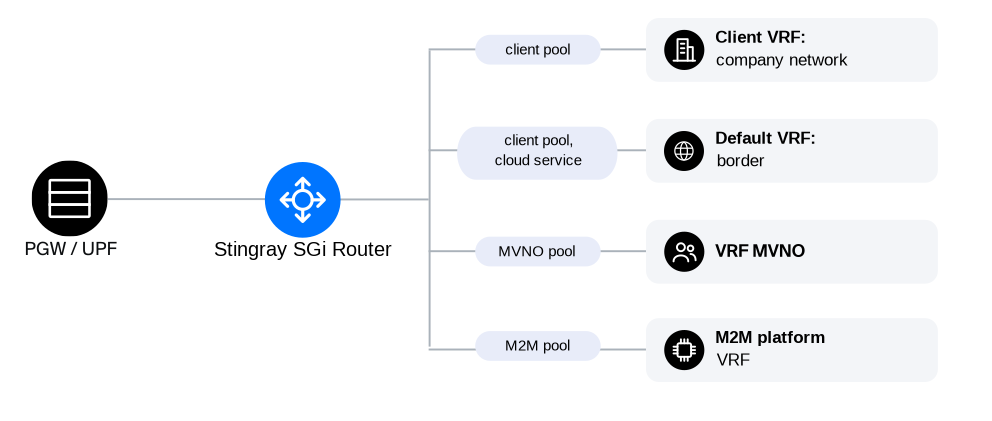
Figure 1. The source pool selects the policy, and the policy selects the breakout
Customer isolation is provided by VRFs and destination network rules. Server name rules choose a path only within those boundaries. If a name rule opens an unintended path for a corporate pool, the configuration check will warn you.
The node does not change subscriber or server addresses, so accounting, CG-NAT, traffic filtering, and lawful interception keep working as before.
How the node detects the server name in TLS, QUIC, and HTTP is covered in the article “Subscribers can’t reach international services that block access from their IP addresses.”
Why it works
The main advantage of this approach is that all of the traffic-splitting logic is moved out of the core to a separate node behind SGi. The core keeps working as before, while customer onboarding, rules, and routing are configured only on this node. This makes the solution easy to scale and puts almost no load on the hardware:
- A new customer is a configuration entry, not work in the core. The pool, policy, and VRF are applied without restarting the node and without interrupting other subscribers’ traffic.
- One node is enough for hundreds of customers. Limits and memory usage are shown in the table below.
Table — Traffic-splitting node capacity
| Node parameter | Value |
| Subscriber pools | Up to 65,535 |
| Policies | Up to 1,024, with 256 rules each |
| VRFs | Up to 4,094 |
| Memory for all 65,535 pools | 1.41 MiB |
| Memory for all 262,144 rules | 11.6 MiB |
| Rule table build time | 0.075–0.094 s |
- The hundredth customer costs the node the same as the first. When the number of rules grows from 10 to 1,000, the per-packet processing cost changes by only 0.3%.
- A destination network rule adds practically no load. Such traffic passes through the node as it would through a regular router, with no connection entry and no content inspection.
Additional capabilities
Beyond the core splitting by pools and destination networks, the node supports additional scenarios: finer-grained routing, redundancy, and configuration checks before changes are applied.
Routing
- Server name exceptions. For a corporate access point, you can define a list of the customer’s approved cloud services. The customer can maintain this list itself, and the node will download it from a URL.
For details, see the article “Service lists change every day, but every routing change waits for a maintenance window.”
- A separate VRF for operator services. The operator’s internal services (IMS, portals, updates) can be moved to a separate VRF that doesn’t go out to the network edge.
Fault tolerance
- Distributing customers across nodes. Customers can be spread across different nodes. In an active-active node pair, pools are divided into partitions, and each node backs up its neighbor’s partitions.
Configuration checks
- Check before applying. The skat-sgi config check command shows errors and warnings, and skat-sgi config diff shows the differences from the running configuration.
- Path check for a flow. The skat-sgi decide pool=
dst=
sni=command shows which path the node will choose for a flow with these parameters.
Onboarding a customer takes four configuration entries and the skat-sgi config apply command.
vrfs:
  - {name: corp-acme, table: 20, uplinks: [Eth1/0/0.300]}       # customer network
pools:
  - {name: acme-apn, prefixes: [10.50.0.0/20], policy: p-acme}
lists:
  sni-acme-saas: {file: /etc/skat-sgi/lists/acme-saas.sni}      # cloud services
policies:
  p-acme:
    default_vrf: corp-acme
    rules:
      - {match: {sni: sni-acme-saas}, action: {vrf: common}}    # to the public internet
Summary
Customer traffic splitting moves from the network core to the SGi interface. A new customer or MVNO is onboarded with a configuration entry, with no work on the PGW or UPF, and the number of customers and rules has almost no effect on node performance.
Transit is expensive, yet traffic to caches, partners, and the operator’s own services still goes through the shared edge
Not all subscriber traffic needs to leave the network through the shared edge. Let’s look at how to send it along a shorter, cheaper path.
The challenge and its cost
Usually, all subscriber traffic leaves the network by the same path: through the edge with CG-NAT, traffic filtering, and transit links. Traffic that doesn’t need the edge at all takes the same path. This includes video from content delivery network (CDN) caches installed in the operator’s network, traffic to partners with a direct peering link, and requests to the operator’s own services such as IMS, the self-service portal, and update servers.
As a result, the operator pays for transit it wouldn’t otherwise need to buy and scales up CG-NAT and filtering capacity for traffic that doesn’t need them. And the subscriber gets extra latency.
Separating this traffic by destination address isn’t always possible. Services and caches often share addresses with other sites, so the path has to be chosen by server name.
The solution
Create a separate VRF, that is, a separate routing table, on the SGi interface for each breakout: a direct peering link with a partner, a cache, or the internal environment. Stingray SGi Router will steer the right traffic into it in one of two ways.
- By destination network, when the service has its own addresses. Routes for each VRF arrive via BGP from neighboring routers, so the networks a partner announces go straight into its VRF.
- By server name, when the address is shared. The node detects the server name from the start of the connection and uses it to choose the VRF.
How the node detects the name is covered in detail in the article “Subscribers can’t reach international services that block access from their IP addresses.”
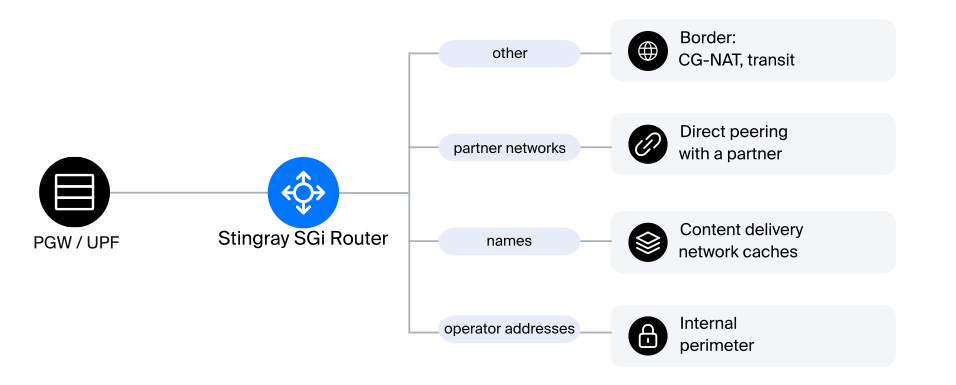
Figure 2. A separate breakout for each type of traffic
Traffic to caches, partners, and internal services doesn’t load CG-NAT and filtering because it never reaches the edge. Everything not selected by the rules goes to the edge the same way as before.
Why it works
Most traffic passes through the node without any extra processing. Additional resources are spent only on the share of traffic that needs to be steered by server name.
- The bulk of traffic goes through without extra processing. A destination network rule needs neither content inspection nor a connection entry. The route for an address is found in no more than three memory accesses.
- Extra load applies only to the steered share of traffic. If 10% of flows are moved to another VRF by name and the node has to recalculate their TCP parameters, node throughput drops by 12%. QUIC flows are steered without this recalculation because the decision is made before the server responds.
- The node handles large address tables. Measurement results are shown in Table 1.
Table 1 — Working with large routing tables
| Operation | Result |
| Storing 1 million prefixes | 131.4 MiB of memory |
| Loading 1 million prefixes | No more than 1.44 s |
| Loading 100,000 routes under a load of 1 million packets/s | 1.81 s, no traffic loss |
| A single route change in a table of 100,000 entries | 0.133 ms (median) |
| Memory per route | About 0.32 KB |
Additional capabilities
Besides splitting traffic across breakouts, the node lets you configure paths flexibly, attach processing services selectively, and measure the results.
Routing
- Different paths for different plans. Rules are stored in the pool policy, so a direct peering link or cache can be enabled for only some pools and access points (APNs).
- Breakout via in-country networks for selected services. A VRF with a direct peering link provides predictable latency and cost.
Processing services
- Processing only the traffic that needs it. Video optimization or parental control can be placed in a separate VRF. The node will send only the traffic of selected services or pools there, and that traffic will then continue to the edge. There’s no need to put an analysis device inline for all traffic.
Monitoring
- Measuring the impact. Prometheus metrics show decisions for each rule and each VRF, that is, how many flows took each path.
How to enable it
The solution is enabled in four steps:
- Define the breakout VRFs with their interfaces and BGP sessions to neighbors (FRR on the node).
- Set up lists of service addresses and names. The node can download a CDN provider’s lists from a URL.
For details, see the article “Service lists change every day, but every routing change waits for a maintenance window.”
- Add rules to the policies: first by destination network, then by name where the address is shared.
- Check path selection with the skat-sgi decide command, apply with skat-sgi config apply, and compare VRF decisions in the metrics.
Summary
Traffic to caches, partners, and operator services leaves the SGi interface by its own paths and never reaches the shared edge. The operator pays less for transit and doesn’t need to scale up CG-NAT and filtering capacity for this traffic, while most flows pass through the node as fast as through a regular router.
Subscribers can’t reach international services that block access from their IP addresses
When a service blocks access from a country’s IP addresses on its own initiative, subscribers blame the operator. Let’s look at how an operator can restore subscribers’ access to such services.
The challenge and its cost
Many popular international services, including cutting-edge AI services, restrict access from certain countries’ IP addresses at their own discretion. Consumer subscribers need them for study and work, and corporate customers use them as business tools.
Yet the subscriber doesn’t see the service’s decision; they just see that their connection isn’t working. Support requests go up, and corporate customers start choosing operators based on who gives them access to the services they need.
Sending all traffic through an international point of presence isn’t an option. Those links are expensive, they add latency for local services, and they bypass the standard path. Only traffic to the services on the list should go there. But these services run over HTTPS and HTTP, and the server address is often shared by many sites. So the path has to be chosen by server name.
How to solve it
Stingray SGi Router sits at the exit of the mobile core (the SGi interface) and chooses a path for each new connection based on lists of service addresses and names. If a connection matches a list, it goes to the international breakout VRF, that is, a separate routing table with an exit abroad. If not, it takes the regular path. The node takes the server name from the very start of the connection.
- TLS over TCP. The name is taken from the unencrypted part of the client’s first message (ClientHello). This works even when a large ClientHello with post-quantum key exchange is split across several segments.
- QUIC and HTTP/3. The name is taken from the first packet (Initial). Its protection is removed using keys derived from the packet itself, the same way DPI-based filtering systems do it. The decision is made before the server responds.
- Plain HTTP. The name is taken from the Host field.
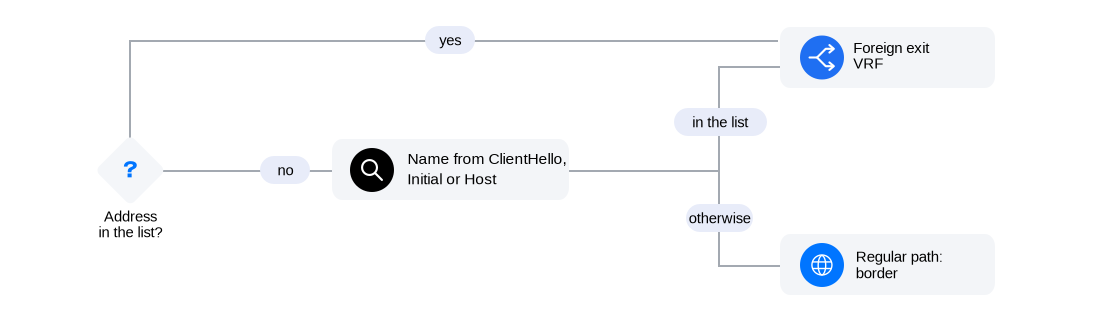
Figure 3. Choosing a path for a new connection by server name
The node doesn’t interfere with content
The node doesn’t terminate TLS connections, doesn’t decrypt subscriber data, and doesn’t require any settings on subscriber devices. Subscriber and server addresses don’t change, so CG-NAT, traffic filtering, and lawful interception keep working as before. The node sits before the network edge and only chooses the path.
For a TCP connection that needs to be moved to another VRF, the node opens a connection to the same server through the target VRF. The client sees a single connection, and the move adds one round-trip time (RTT) to it.
Encrypted names
Some sites publish an ECH key that hides the real server name. Among the top 10,000 domains in the Tranco ranking, 5.7% do so. For ECH, the operator chooses one of three actions: apply the rule based on the ECH provider’s outer name (the default), reset the connection, or send it along the default path.
If the name can’t be determined, the connection isn’t dropped; it takes the policy’s fallback path, usually the default one.
Why it works
The node detects the server name accurately and uses few resources to do so because it parses only the start of the connection.
- The node gets the name right. The node was tested on 159,633 real connections from 14 clients and builds (browsers, utilities, and libraries) to the 10,000 most visited domains, including over HTTP/3 and with ECH. It didn’t make a single mistake in the name, the ECH flag, or the failure reason.
- Only the relevant share of traffic pays the cost. The node parses only the start of a connection, and after that packets follow the flow entry. Connections that don’t need a name rule pass through the node as through a regular router.
- QUIC parsing is cheap. Removing the first packet’s protection and extracting the name takes about 2 µs per core.
Additional capabilities
The node lets you configure QUIC handling and behavior when a breakout is unavailable, and use service lists more broadly.
Node behavior
- QUIC handling mode. Three modes are available:
- route (default): the node steers traffic by server name;
- block: the node blocks QUIC, the client falls back to TCP, and the connection is handled as a regular TCP connection;
- pass: traffic passes through without inspection.
- Response to an unavailable breakout. If the server doesn’t respond through the international VRF, the on_unreachable setting determines what happens next. The fallback value sends the connection along the regular path, while reset (the default) immediately reports an error to the client.
Service lists
- Lists for corporate customers. The same lists can be enabled for corporate customers through a rule in their pool policy.
For details, see the article “Corporate customers and MVNOs need their own breakout, but rebuilding the network core for each one is slow and risky.”
- Outsourcing list maintenance to a provider. A provider can maintain the lists, and the node will download them from a URL automatically.
For details, see the article “Service lists change every day, but every routing change waits for a maintenance window.”
How to enable it
It takes four steps:
- Define the international breakout VRF (a tunnel or dedicated link to the point of presence) and set its MTU, that is, the maximum packet size. If the MTU is smaller than usual, the node automatically reduces the TCP segment size (the inspect.mss_clamp: auto setting).
- Set up the sni-foreign server name list and the ip-foreign address list. Names can be specified exactly or with a mask such as *.domain.
- Add two rules to the policy:
- {match: {dst: ip-foreign}, action: {vrf: foreign}}
- {match: {sni: sni-foreign}, action: {vrf: foreign}}
- Check path selection with the skat-sgi decide command, apply the configuration with skat-sgi config apply, and monitor rule decisions in Prometheus metrics.
Summary
Traffic to services that block access from subscribers’ IP addresses goes through the operator’s international breakout, while all other traffic takes the regular path. Subscribers don’t need to configure anything, and accounting, CG-NAT, traffic filtering, and lawful interception keep working as before. The node detects the server name in TLS, QUIC, and HTTP, including with ECH, and across 159,633 real connections it did so without a single error.
A new node in the path of all subscriber traffic risks becoming a bottleneck and a point of failure
Any new node in the path of all traffic raises a legitimate reliability question for the operator. Let’s look at why Stingray SGi Router doesn’t become the weak link in the network.
The challenge and its cost
Anything placed on the SGi interface, that is, at the exit of the mobile core, carries the traffic of every subscriber. If the node can’t handle the load, it holds back network growth and has to be replaced with a more powerful one within a year. If the node fails, every subscriber behind it loses internet access. If it has to be shut down for updates, every update becomes a nighttime maintenance window and a risk.
So the operator has every right to ask whether a new node that solves the problems described in the other articles of this series will become the weakest link in the network.
How to solve it
Build the node so that expensive processing applies only to the share of traffic that needs a special path. Forward everything else as a regular router would. And deploy nodes in pairs.
- The bulk of traffic goes through as if through a regular router. A connection entry is created only for flows that are awaiting a name-based decision, have been moved to another VRF, or are routed by name in QUIC. Everything else follows the routing tables with no entries.
- Packets are processed on dedicated cores. Packets go from the network card straight into the processing program’s memory (DPDK) and are processed in batches on pinned cores, with no interrupts and no switching into the operating system kernel. Each flow is pinned to a single core, and cores don’t share entries or wait for each other.
- Overload doesn’t cause traffic loss. If resources run short or a subscriber exceeds the new connection limit (200 per second by default), traffic isn’t lost; it takes the default path. Every such event is visible in the metrics.
- Nodes work in pairs over BGP and BFD. Two setups are possible. In the first, one node is active and the other is standby. In the second, both are active: each serves its own pools and backs up its neighbor’s pools. The standby node announces less-preferred routes in advance, so neighbors already have a path to it. The node monitors its processing cores, interfaces, API, and configuration, and withdraws its routes if something goes wrong.
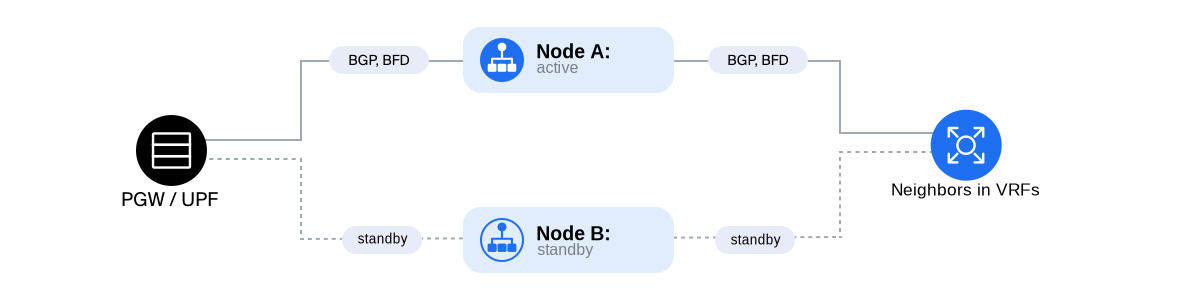
Figure 4. A node pair on the SGi interface
Why it works
Tests show that the node becomes neither a bottleneck nor a point of failure. It has plenty of performance and capacity headroom, and no traffic is lost during overload or failure:
- High throughput on a single core. One processing core forwards 5.57 million packets per second with 64-byte frames and no loss. It accepts more than 100,000 new TLS connections per second with a move to another VRF and 205,000 new QUIC flows per second.
- Nearly linear scaling with the number of cores. Four cores accept 750,000 new QUIC flows per second, which is 91% of linear scaling.
- Subscriber headroom. Estimated server figures are shown in Table 1. One million subscribers with full redundancy are served by a single pair of 1U servers, and ten million by four pairs of 2U servers.
Table 1 — Estimated server capacity, calculated at no more than 80% load
| Server | Subscribers | Traffic |
| 16 cores, 1U chassis | 1.03 million | 145 Gbps |
| 64 cores, 2U chassis | 2.53 million | 356 Gbps |
- A large connection table. The node holds 48 million connection entries, while one million subscribers need about 3.1 million by estimate.
- Overload doesn’t knock the node out of the pair. Over an hour of operation with incoming traffic at about 126% of the limit, there wasn’t a single false BFD trigger.
- Failover happens in a fraction of a second. Neighbors detect a node failure within 300 ms (BFD, 100 ms × 3) and move traffic to the standby node, to which they already have a path.
Additional capabilities
Maintenance
- Updates without interrupting the bulk of traffic. The skat-sgi node drain command takes the node out of service: its routes become less preferred, and traffic moves to the neighboring node. After the update, the skat-sgi node undrain command returns the node to the standby role. Connections moved to another VRF and QUIC flows for which the node kept a connection entry are dropped in the process, and clients reopen them. That’s why it’s best to update during off-peak hours.
Scaling
- Both nodes in the pair at work. In the active-active setup, pools are divided into partitions. Each node serves its own partitions and backs up its neighbor’s.
- Adding capacity with new pairs. New pools and access points (APNs) can be moved to a new node pair without affecting the ones already running.
- Multiple delivery options. The node is available as a server running Ubuntu 24.04 or EL9, as a virtual network function for OpenStack, or as a containerized network function for Kubernetes with a ready-made Helm chart.
Monitoring
- Pair monitoring. The skat-sgi ha status command shows the node’s role and the state of BGP and BFD sessions. Prometheus metrics show the node’s role, limits, and table utilization, and the /healthz endpoint reports node status to monitoring systems and Kubernetes.
Summary
Expensive processing applies only to the share of traffic that needs a special path, and throughput grows almost linearly with the number of cores. A node pair switches traffic over in a fraction of a second on failure and lets you update nodes without interrupting the bulk of traffic. That’s why a node on SGi becomes neither a bottleneck nor a single point of failure.
Service lists change every day, but every routing change waits for a maintenance window
Service-based routing is only as good as its lists are fresh. Let’s look at how to update them without nighttime windows and without risk to subscribers.
The challenge and its cost
Service-based routing relies on lists of addresses and names, and those lists change constantly. Services add new domains, content delivery networks (CDNs) change addresses, and list providers publish updates several times a day.
If every change means a manual upload, a hardware restart, and a nighttime maintenance window, the lists fall days behind reality. Subscribers see a service working one moment and not the next, and engineers spend their nights on routine work. There’s another risk, too: a corrupted or incomplete list applied without validation immediately sends thousands of subscribers’ traffic down the wrong path.
How to solve it
The Stingray SGi Router node updates lists on its own, and changes require neither a manual upload nor a restart.
In Stingray SGi Router, a list is a separate object that rules refer to. The list source is chosen based on how it’s most convenient to maintain. A list can be defined directly in the configuration, as a file on the node, as a key in Redis, or as a URL on a server over HTTP, HTTPS, FTP, or SFTP. In the last case, the node downloads the list on a schedule by itself. The text format is compatible with Stingray DPI lists, so a single list can serve both products.
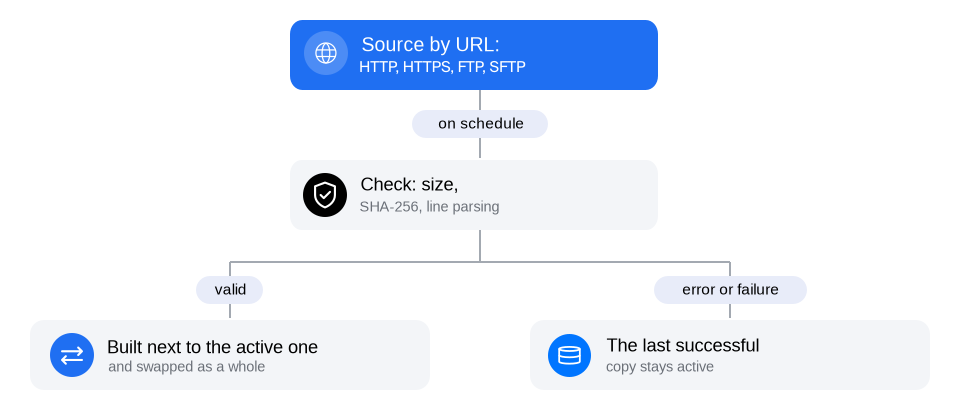
Figure 5. How a list travels from an external source
No nighttime window is needed for updates either. The new list is built alongside the active one and replaces it entirely, without restarting the node, while connections already in progress stay on their path.
To keep a corrupted or incomplete list from misrouting subscriber traffic, the node validates it before applying it: by size, by SHA-256 checksum (if one is set), and by parsing the lines. If more than 1% of the lines contain errors, the list isn’t applied.
If the source is unavailable, the node keeps working with the last successfully downloaded copy. It’s stored on disk and survives restarts, and download retries are made with an increasing interval. Each node in the pair downloads the list independently, so a failure on one node doesn’t affect the other.
Because lists are downloaded from external servers, the credentials used to access them are protected. Passwords, tokens, and keys are read only from files and never end up in logs, metrics, or the API. The HTTPS server certificate and the SFTP host key are always verified.
Why it works
List changes are applied within seconds, without restarting the node and without traffic loss, and list size has almost no effect on throughput or memory usage:
- Changes take effect within seconds. A new list of 1 million names takes effect in 6.91 s (median) and no later than 11.23 s, with no traffic loss. This time includes waiting for the next file or Redis check, which runs every 10 s. Building such a list itself takes 1.33–1.36 s.
- List size doesn’t slow the node down. As a list grows from 10⁴ to 10⁶ names, the per-packet processing cost changes by only 0.4%, and a name lookup in a list of 1 million entries takes 169–172 ns.
- Memory requirements are modest. 1 million names take up 32 MiB, and 1 million prefixes take 131.4 MiB. While a list is being replaced, a second copy is kept in memory.
Additional capabilities
The node lets you update lists manually, check their contents, monitor downloads, and store lists centrally.
Updating and checking
- On-demand updates. To update a list right away without waiting for the schedule, use the skat-sgi list fetch
command. - List check. The skat-sgi list show
command shows the list version number, the number of entries, the time of the last successful download, and the last error, if any. The skat-sgi list test command shows whether an entry is in the list.
Monitoring and storage
- Download monitoring. The number of consecutive failed downloads is exposed in the API and Prometheus metrics, which makes it easy to set up alerts.
- Storing a list in Redis. In this case, one system writes the list, and all nodes connected to that Redis instance receive the change automatically.
How to connect it
A provider’s list is connected with a single entry.
lists:
  sni-vendor:
    url: https://lists.example.net/skat/foreign.sni
    refresh_s: 3600                                   # once an hour
    sha256: sidecar                                   # checksum from foreign.sni.sha256
    token_file: /etc/skat-sgi/secrets/vendor.token
After that, the list can be used in policy rules just like a local file.
Summary
Lists are updated automatically, without nighttime maintenance windows and without restarting the node. A new list takes effect a few seconds after it’s downloaded. A corrupted list isn’t applied, and if the source fails, the node keeps working with the last successfully downloaded copy. List size has almost no effect on node performance.