
In this article, we look at how Stingray SGi Router works and how it fits into an operator’s network. We show how to send the traffic of specific services along a different path without an inline DPI node and without any settings on subscriber devices.
Where It Sits in the Network and What It Does
SGi Router receives subscriber traffic from the PGW or UPF and sends each flow to the right VRF (Virtual Routing and Forwarding), that is, a separate routing table. The node chooses the path based on three attributes: the subscriber’s IP pool, the destination network, and the server name (SNI).
This kind of path selection covers three types of tasks that operators typically face on SGi.
- Foreign services. Send traffic for foreign services that restrict access from IP addresses in the operator’s country through the operator’s point of presence abroad, with no settings on the subscriber’s device.
- Internal and enterprise segments. Send part of the subscriber traffic to an enterprise network or to the operator’s internal segment. These are closed exits for operator services (IMS, portals, caches) and for enterprise APNs.
- Isolating specific subscriber groups. Dedicated exits for MVNO subscribers and M2M devices.
Deployment Topology
In this topology, every network exit is set up as a separate VRF.
| Element | Role |
| PGW / UPF | Hands subscriber traffic to SGi, typically with a separate VLAN per APN |
| Default VRF | The operator’s network edge with the standard CG-NAT. All traffic that matches no rule goes to this VRF |
| Foreign exit VRF | The operator’s point of presence abroad: a tunnel or a dedicated link |
| Enterprise network VRF | L3VPN for enterprise APN customers. Permitted external services are defined as exceptions by destination network and SNI |
| Internal services VRF | Operator services with no exit to the edge |
SGi Router sits before the network edge, that is, in front of the standard CG-NAT, and its only job for each flow is to choose a VRF. In this topology, the edge itself is the default VRF. All traffic that matches no rule ends up there and then passes through CG-NAT, just as it did before the node was installed. Only flows that match the rules take a different path.
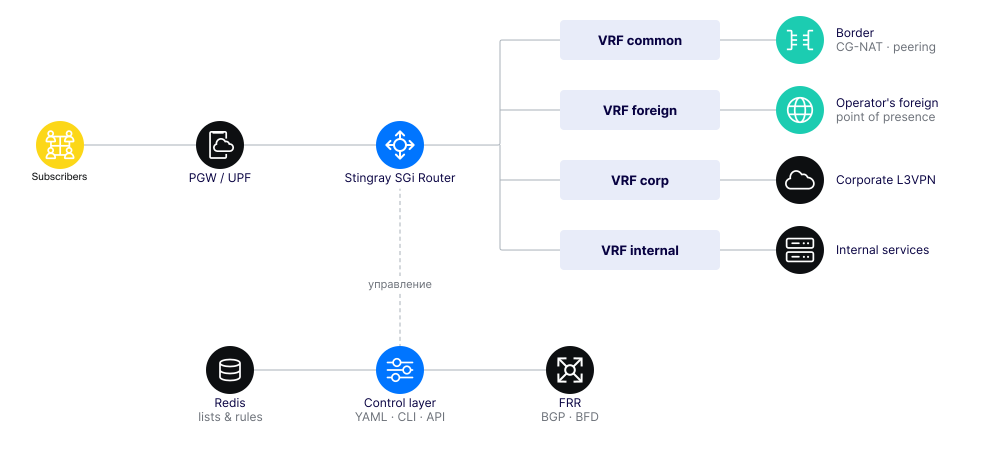
Figure 1. Where Stingray SGi Router sits in the operator’s network
How SGi Router Chooses a Path
We mentioned above that SGi Router chooses a path based on the subscriber’s IP pool, the destination network, and the server name. Let’s look more closely at how the operator defines these conditions and where traffic goes when it matches none of them. VRF selection works on two levels: policies and rules.
The node picks a policy by the source IP pool, that is, the subscriber pool. If the PGW assigns addresses for each APN from a separate pool, the policy is effectively defined per APN.
Next, the node checks the rules of the selected policy. Each rule compares the flow’s destination network and server name against the configured values and, on a match, takes one of three actions:
- send the flow to the selected VRF;
- reset the connection;
- block the traffic.
If no rule matches, the traffic goes to the policy’s default VRF.
Destination networks and server names for rules are defined as lists. Names are specified exactly or with a *.domain wildcard, and the plain-text list format is compatible with Stingray DPI lists. A destination network rule requires neither content inspection nor a flow record.
Name-based rules have a limitation that matters for isolating segments and enterprise APNs. The server name is set by the client, so it cannot be relied on for isolation. Isolation is built on destination networks and the default VRF, while name-based rules only choose a path within those boundaries. Name-based exceptions for enterprise pools should be combined with a destination network restriction. If a name-based rule opens a path for an enterprise pool outside its segment, the configuration check issues a warning.
How the Node Determines the Server Name
A name-based rule fires only when the name can be extracted from the first packets of the connection. Where the name sits depends on the protocol, and the node has its own parsing method for each case. Stingray SGi Router parses three name sources: TLS over TCP, the QUIC Initial packet, and plain HTTP. The node handles ECH separately, since it hides the real name.
The server_name extension in the TLS ClientHello, in which the client sends the server name in plain text.
The first packet of a QUIC connection; its protection is removed with keys derived from the packet itself. ECH (Encrypted Client Hello) is a mechanism that encrypts the real name and leaves only the ECH outer name in the clear.
A dummy ECH extension that the client sends without any real encryption.
| Case | What the node does |
| TLS over TCP | Reads the name from the server_name extension in the ClientHello. TLS 1.2 and 1.3 are supported. The ClientHello can be split across several TLS records and TCP segments |
| QUIC v1 and v2 | Removes the Initial packet protection with keys derived from the packet itself (RFC 9001) and reassembles the ClientHello from CRYPTO frames. The decision is made before the server responds, with no translation |
| Large ClientHello | A ClientHello with post-quantum key exchange, including one with ECH, spans two Initial packets. The node reassembles it by offset |
| Out-of-order segments | TCP segments are reordered by sequence number, duplicates are discarded, and CRYPTO frames are accepted in any order. Processing cost rises by 2% for TCP and 11% for QUIC |
| ECH | At the operator’s choice: rules are applied to the ECH outer name (default), the connection is reset, or it is sent along the default path. GREASE-ECH does not affect the decision |
| Plain HTTP | On configured ports, the name is taken from the request line or the Host header |
Three processing modes are available for QUIC:
- route: name-based routing. The decision is made on the first ClientHello and stays the same until the connection ends;
- block: QUIC is blocked, the client usually falls back to TCP, and the connection is then handled as TCP;
- pass: pass-through with no parsing.
While the node looks for the name, it holds the first data of the connection. Holding is limited by size and time, 4 KB and 20 ms by default. The name may remain undetermined in four cases:
- the ClientHello has no server_name extension;
- the name is invalid;
- the ClientHello was not reassembled within the hold limits;
- the ClientHello could not be decrypted.
In that case, SGi Router sends the flow according to the policy’s fallback action, usually to the default VRF. The held data is not lost; it is passed on. Each such outcome is tracked by its own counter.
If the name could not be determined for QUIC, the fallback decision is pinned to the flow for 10 seconds so that packets of the same connection don’t diverge across different paths.
How a TCP Connection Moves to Another VRF
Once the name is determined and matches a rule, the flow needs to go to the selected VRF. For QUIC, this is simple: the name arrives in the first packet, and the node picks the VRF before the server responds. TCP needs a separate mechanism, and it determines how much is added to connection setup time and for which connections the node keeps state.
How the Connection Is Handled
In TCP, the name arrives only after the connection is established, and the node handles it as follows:
- The subscriber’s SYN goes along the default path unchanged.
- The node holds the first data segments while it parses the ClientHello.
- If the name matches no rule, the held data is passed to the server, the flow record is deleted, and from then on the node acts as an ordinary router for this connection.
- If the name matches a rule, the node opens a connection to the same server address through the target VRF and passes the ClientHello to the server.
- The node closes the connection already started with the server along the default path, and that server never receives the ClientHello.
- Until the connection ends, the node translates sequence numbers, window, and timestamps.
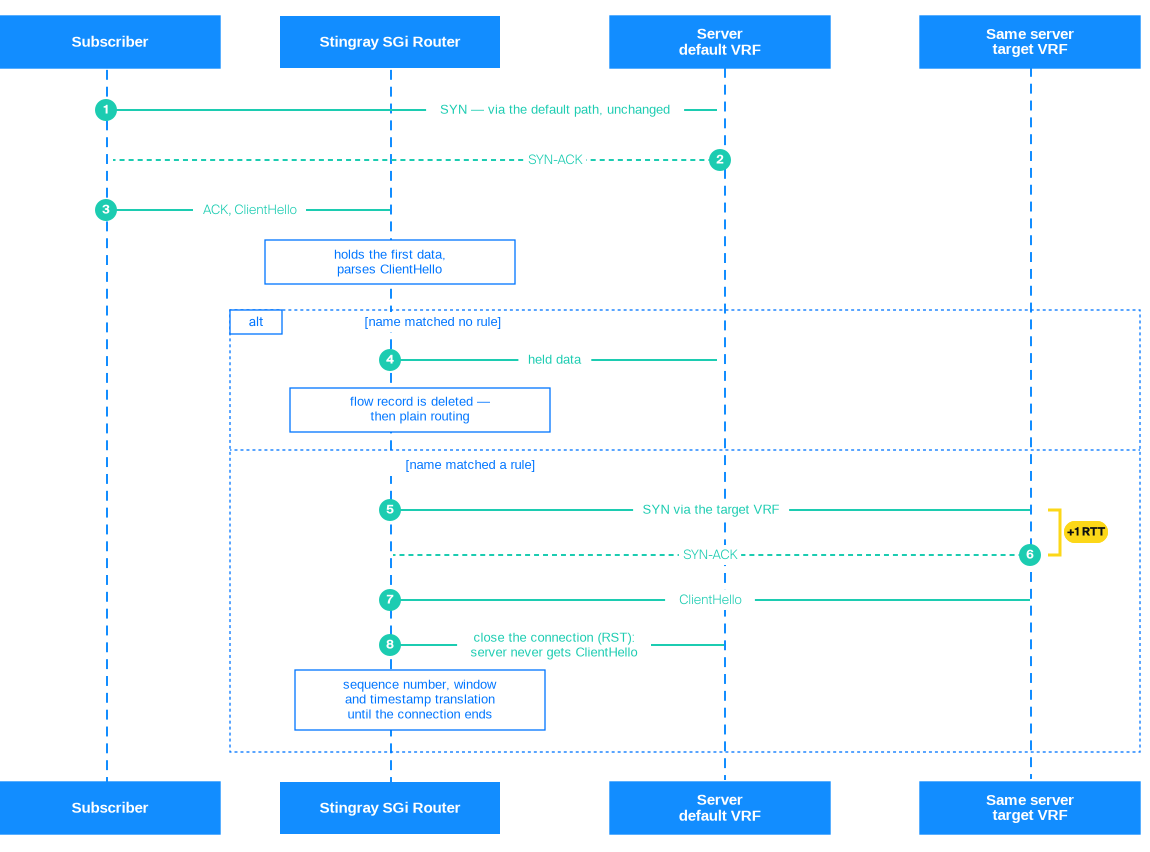
Figure 2. Moving a TCP connection to the target VRF
Most traffic goes through steps 1–3, with no state and no translation. In a moved connection, the client sees a single connection to a single address, and the move adds one RTT to it. Translation applies only to the share of traffic that actually needs a different path.
The move mechanism relies on three assumptions: the server on the default path responds to the SYN, the record of a moved connection is kept until it ends, and the node has enough resources for new records. In a real network, any of these can break, and it’s important to understand how the node behaves in those cases.
| Situation | What the node does |
| The server on the default path rejected the connection or did not respond to the SYN | Responds to the client’s SYN itself, receives the ClientHello and, if the name matches, opens a connection in the selected VRF. It remembers the server address and sends subsequent connections to it straight to that VRF |
| The flow record is lost (for example, after a data plane restart) | The client of the moved connection receives a reset and reconnects. The node also closes the connection to the server in the target VRF with a reset, so no half-open connections remain. Main traffic is not affected |
| The record creation rate exceeds the limit (by default, 200 new records per second per subscriber address) | Traffic above the limit goes along the default path, temporarily without name-based routing. Each such case is reflected in the metrics |
Reliability
Node Pair
All subscriber traffic passes through the node on SGi, so its failure must not bring the network down. Stingray SGi Router nodes work in pairs using one of two schemes:
- active-standby: the standby node takes traffic only if the active one fails;
- active-active: each node serves its own pools and APNs and at the same time backs up its peer’s pools.
Using FRR (FRRouting, a suite of routing daemons), each node maintains BGP sessions with BFD (Bidirectional Forwarding Detection) with the PGW/UPF and the VRF neighbors. The standby node advertises the same routes with a worse metric, so neighbors already have a path to it in advance.
Node Failure
Let’s look at what happens to traffic and nodes in failure scenarios.
| Event | Result |
| Active node failure | Neighbors detect the failure within 300 ms, and traffic moves to the standby node. The longest interruption in testing was 310 ms |
| Planned node removal (node drain) | Neighbors switch routes within 0.4–0.5 s, and main traffic is not interrupted |
| Data plane restart | The configuration loads in 1.3–1.8 s. Stateless flows resume within a few seconds, driven by TCP retransmission timers on the client side |
| Incoming traffic above the node limit for 1 hour | Not a single false BFD trigger |
Node failure, drain, and restart were measured on a test bench with no load, and BFD stability with incoming traffic at about 126% of the core limit.
Planned Drain and Restart
During a planned node drain, neighbors switch routes within 0.4–0.5 s, and main traffic is not interrupted. Moved connections and QUIC flows with a record are dropped, just as in a failure.
During a data plane restart, the configuration loads in 1.3–1.8 s, and stateless flows resume within a few seconds, driven by TCP retransmission timers on the client side.
- BFD on the neighbors is mandatory; without it, failover relies on BGP timers and takes seconds.
- It’s best to run updates during off-peak hours, because switching nodes drops moved connections and QUIC flows with a record.
Management and Monitoring
Stingray SGi Router consists of two parts: a data plane module and a control layer.
The data plane module handles traffic. It receives subscriber packets from the PGW or UPF, determines the server name, chooses the VRF, and forwards the flow. The module is built on DPDK and designed for high packet processing rates.
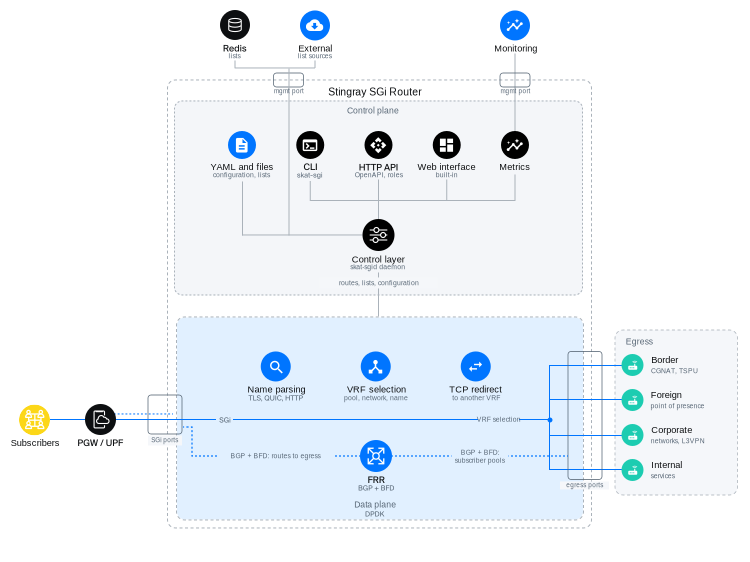
Figure 3. Stingray SGi Router architecture: data plane and control layer
The control layer prepares everything the module needs to operate and monitors the node. This is the skat-sgid daemon. It stores the configuration in a YAML file, collects network and name lists from files, Redis, and external sources, manages routes and the node pair, and generates metrics. All management tools also work through the daemon:
- the skat-sgi command-line utility;
- an HTTP API with an OpenAPI contract, password or token authentication, and “read” and “write” roles;
- a web interface built into the daemon that requires no external resources.
The module keeps processing traffic even without the control layer. If the daemon or Redis fails, the data plane does not stop.
Summary
Stingray SGi Router lets you send part of the subscriber traffic along a different path right on the SGi interface, without a separate DPI node and without any settings on subscriber devices. The node can run on a dedicated server, in a virtual machine, or in Kubernetes.
To see how Stingray SGi Router will fit into your network, submit a request. We’ll work out a configuration for your traffic profile and subscriber count.