
In our previous article, we covered what GTPCProxy can do. Now let’s look under the hood, break down how GTPCProxy is built and share our benchmark results.
A Multithreaded Core with No Shared Structures
The key idea is that the proxy’s worker threads don’t get in each other’s way. All GTPCProxy sessions are split into 1,024 partitions. Each partition is pinned to a single worker thread, and one thread serves many partitions.
There are no mutable structures shared between threads. As a result, worker threads don’t need to coordinate access to data, and each new thread adds performance with almost no overhead. Our measurements confirm this: at 50% of peak load, not a single worker thread lock was recorded over a minute.
Responses from PGW gateways and Echo keepalive messages, which tell the proxy a gateway is alive, go through a separate queue rather than alongside new requests. So even at peak load, responses are processed without delay and health checks complete on time. The proxy won’t mistake a healthy gateway for a failed one just because it was busy itself.
If the proxy does become overloaded, it handles messages by priority. Messages for established sessions come first, followed by requests for new connections. That way, subscribers already on the network aren’t affected by a surge of new ones.
Vertical Scaling: Benchmark Results
The proxy writes the state of every session to Redis, a fast in-memory database. This can be a single Redis server or a cluster in which each node has a backup copy (a replica).
Each worker thread has its own write channel to the store and its own Redis primary node with a replica.
In this setup, we measured how many Modify Bearer requests the proxy can sustain continuously without errors. (Modify Bearer is a request to change the parameters of an existing subscriber session):
| Worker threads | Modify Bearer per second | Increase over previous row |
| 1 | 87,812 | — |
| 2 | 180,625 | 2.06x |
| 4 | 348,203 | 1.93x |
Going from one thread to two increased capacity 2.06x, and from two to four, 1.93x. Four threads handle 348,203 requests per second. That’s 0.9% less than four times the capacity of a single thread (351,248).
Latency was measured on four threads at 90% of peak load over 30 minutes. The results:
- p50: 0.10 ms,
- p99: 0.33 ms,
- p99.9: 0.56 ms.
Over 30 minutes, the proxy processed 563,776,014 transactions with no errors or losses. Process memory grew by 7.9 MB during that time.
A single Redis instance is enough for smaller networks. But a single Redis instance limits capacity. The proxy handles about 105,000 Modify Bearer requests per second, and adding worker threads doesn’t increase that number.
If a Redis cluster is given the same number of CPU cores as a single server, proxy capacity drops by roughly 21–22%. If each primary node in the cluster gets its own core, performance grows along with the number of proxy worker threads.
Horizontal Scaling and BGP-Based Redundancy
To keep the proxy from becoming a single point of failure, its instances are combined into groups. Each group has its own IP address (/32), which the instances advertise over BGP as reachable through them. The active instance advertises the address with a better route, and the standby with a worse one, so traffic goes to the active instance.
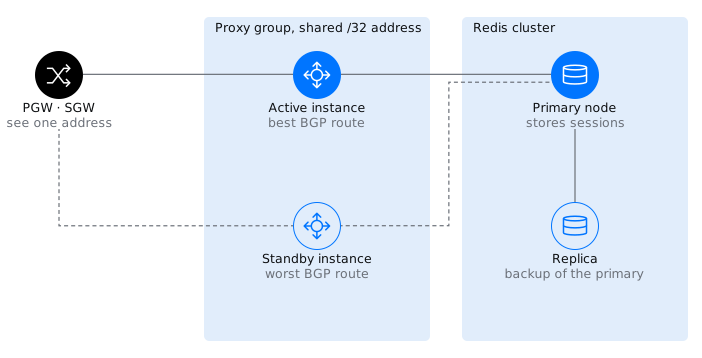
Figure: Neighboring nodes always address the group’s single address. BGP decides which instance is currently responding, and both instances read sessions from the same Redis.
Proxy or Server Failure
A separate program, the BGP watchdog, monitors the proxy process. It checks the process once per second. If an instance is unhealthy for more than 10 seconds, the watchdog stops advertising its address, and traffic moves to the standby instance. An instance can return to service only after 30 seconds of stable operation. This keeps an unstable instance from flapping in and out.
If the entire server or its network connection fails, BFD kicks in. It detects the outage in 900 ms, after three missed checks at 300 ms intervals. The address then moves to the standby instance.
Why Sessions Aren’t Lost
When the standby instance receives a message for a session, it reads that session’s state from Redis by its tunnel endpoint identifier (TEID).
Neighboring nodes don’t notice the switchover either. Each node reports its restart counter (Recovery) to its peers. If the counter changes, the peer assumes the node has rebooted and deletes the sessions associated with it. All instances in a group share the same Recovery value, so the SGW and PGW don’t mistake a switchover for a restart, and sessions are preserved.
Redis Failure
If a Redis primary node fails, its replica takes over. In a series of tests at a load of 6,020 session creation requests per second, failover took no more than 2.03 s.
Proxy Restart
Restarting the proxy doesn’t drop connections. The process itself starts in about 0.135 s (median) and then reads session state from Redis. A hung worker thread is restarted by the thread watchdog timer, a separate mechanism unrelated to the BGP watchdog. During a planned shutdown, the proxy first responds to open transactions.
How to Add Capacity
To serve more subscribers, you add new proxy groups. Their addresses are entered in DNS for the relevant access points (APNs). All groups work with a single Redis cluster.
| Event | How it’s detected | Time |
| Proxy process failure | BGP watchdog, checks once per second | Address withdrawn after 10 s |
| Server or network failure | BFD, 300 ms interval, 3 misses | 900 ms |
| Instance returns to service | BGP watchdog | After 30 s of stable operation |
| Redis primary node failure | Failover to replica | Up to 2.03 s |
| Proxy process startup | — | 0.135 s (median) |
VNF or CNF
The proxy comes in two variants. Redundancy works the same way in both; the only difference is where and how the proxy runs. The first variant is a virtual machine (VNF), and the second is containers in Kubernetes (CNF).
| Virtual machine (VNF) | Kubernetes (CNF) | |
| Platform | VEOS 8 | Kubernetes |
| Installed from | Two RPM packages | An image built from the same RPM packages, plus a Helm chart |
| How it runs | System service (systemd) | StatefulSet, two pods per group |
| Who advertises the group address | FRR and the BGP watchdog | FRR inside the proxy pod |
| Resources and settings | — | Static CPU core pinning, configuration in ConfigMap and Secret |
The virtual machine is updated with the dnf upgrade command. The standby instance is updated first, then the active one.
Monitoring and Management
Prometheus metrics cover messages, transactions, failures, and PGW and storage health. Prebuilt Grafana dashboards are embedded in the proxy’s web interface. It also provides summary metrics, PGW and pool tables, session search and a session detail card, including 2G/3G (GTPv1) parameters.
The interface stays fast even with a large number of sessions. With 100,000 sessions, the first page of the list opens in 6.9 ms, and a search by SIM card number (IMSI) takes 0.4 ms.
Settings are split into two levels.
- The gtpcp.yaml file controls the proxy itself. It defines addresses, the number of threads, CPU core pinning and storage parameters.
- The routing document controls subscriber handling. It defines gateway pools, selection rules, weights, PGW health checks and parameter overrides.
The routing document can be changed without restarting the proxy, using forms or as text in the web interface. The proxy validates the new version before applying it. If it contains an error, the proxy keeps running on the current version. You can always roll back to the previous version. Permissions are split between two roles: administrator and observer.
Conclusion
GTPCProxy scales performance by adding CPU cores and proxy groups, and it stores session state separately, in Redis. That’s why failover to a standby instance is invisible to the SGW and PGW, and they don’t need to do anything for it.
You can verify this on your own SGWs, SGSNs and PGWs in a lab. VAS Experts provides a test package with configuration, scenarios and a toolkit for collecting traces. Contact us to plan your validation.