
The protocol is an industry standard and is supported not only by Cisco devices, but also by many others. This allows it to be used to collect statistics from the DPI platform.
About NetFlow
NetFlow allows you to analyze network traffic at the session level, recording each TCP/IP transaction, which provides fairly detailed statistics. Currently, there are two versions of NetFlow – 5 and 9. An open standard called IPFIX was developed based on version 9. This version also supports additional fields such as IPv6 headers, MPLS flow labels, and BGP gateway addresses.
The following components are required to use the NetFlow protocol:
- Sensor – collects statistics on traffic passing through it. This is usually an L3 switch or router, although standalone sensors that receive data by mirroring the switch port can also be used.
- Collector – collects data received from the sensor and places it in storage.
- Analyzer – analyzes the data collected by the collector and generates human-readable reports (often in the form of graphs).
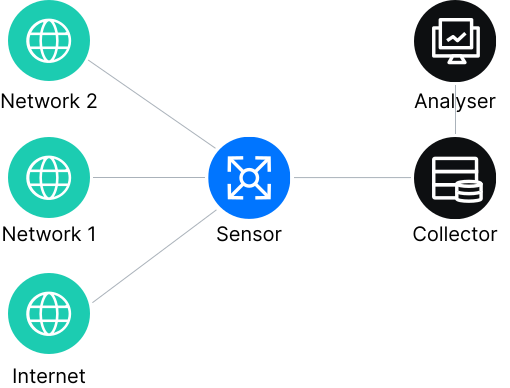
The sensor extracts sets of packets traveling in the same direction from the traffic—streams. Completed or current streams are sent to the collector at a configured frequency.
The collected information is in the form of records containing the following parameters (for version 5):
- protocol version number
- record number
- incoming and outgoing network interface
- start and end time of the stream
- number of bytes and packets in the stream
- source and destination address
- source and destination port
- IP protocol number
- Type of Service value
- for TCP connections – all flags observed during the connection
- gateway address
- source and destination subnet masks.
Data from the collector is sent to the analyzer (processing and visualization system), which must understand the format of the incoming file from the collector and display the information it contains in the form of reports and graphs.
NetFlow for DPI
It is sufficient to export statistics on protocols and directions from DPI systems in NetFlow 5 format, as it is the most common and is supported by most free and commercial tools for collecting and analyzing statistics.
The transfer of DPI information in NetFlow 5 format has a number of features:
- The dstport field is used to transfer information about the protocol used field (port number) is used to transfer information about the protocol used. When possible, the port number assigned to the protocol by the IANA association is used, but for protocols with a free number (torrents, Skype, etc.), a special number is allocated in the upper range (49152–65534) reserved by IANA for private ports. If the protocol cannot be determined, it is assigned port number 65535.
- Protocol statistics are transmitted in aggregated form, i.e., DPI accumulates statistics on the protocol, combining information from different sessions, and then transmits it to the collector at a specified interval. This significantly reduces the amount of information transmitted.
- Information about destinations is transmitted in the dst_as field (autonomous system number).
- Statistics on destinations are transmitted in aggregated form, i.e., DPI accumulates statistics on the destination (AS number), combining information from different sessions, and then transmits it to the collector at a specified interval.
One of the most popular ways to obtain and analyze information from the DPI platform is a combination of:
- a daemon collector that listens to the port, collects data, and writes to files
- a dump that reads and outputs the collected nfcapd data
- a visualizer, which is a graphical interface for nfdump data.
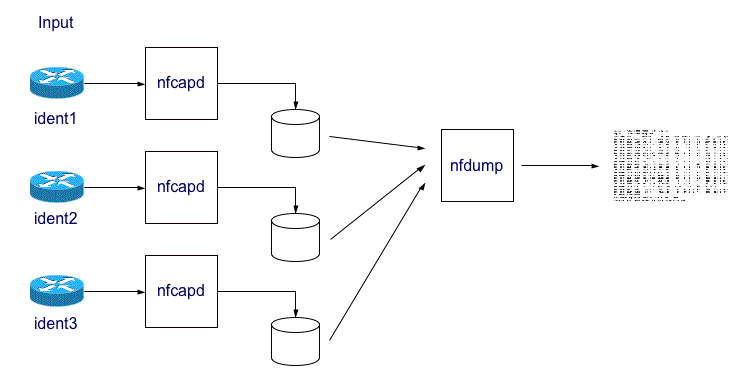
DPI configuration boils down to specifying the following parameters:
- Enabling the statistics collection and export system (by protocols, by directions, for billing, complete statistics by sessions).
- The network interface through which netflow with statistics will be sent.
- Data export frequency.
- The IP address and port number of the collector (or several collectors for different types of data).
To be able to build reports on website traffic, on system subscribers with dynamic address assignment, and to link session and volume data with metadata transmitted within a session, you need to use the IPFIX protocol (a further development of the NetFlow protocol version 9). Any universal IPFIX collector that understands templates or the IPFIX Receiver utility is suitable for collecting information in IPFIX format.
To install NfSen, you will need a computer with CentOS 6 or higher installed. The required disk space is from 250 MB to 1.5 GB per day of storage, depending on the settings. The amount of RAM is from 1G. However, it is not recommended to install NfSen on a server with a DPI platform: report generation is CPU-intensive, which can negatively affect the performance of the DPI platform. Installing NfSen involves installing the Apache web server, and its configuration boils down to enabling autostart and opening ports on the firewall.
After accumulating data for at least one day, NfSen will allow you to build graphs based on protocols, traffic volume, and other information obtained from the DPI system.
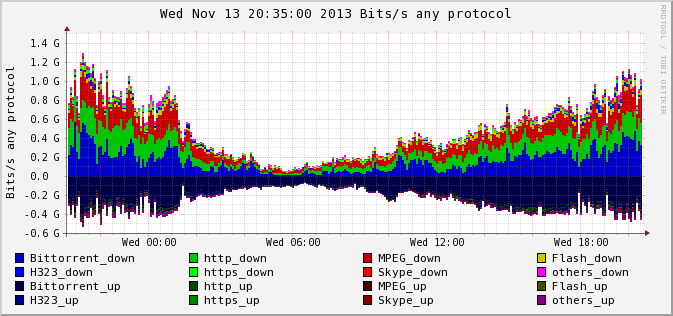
In addition to graphs, NfSen can be used to generate reports for any periods, protocols, and directions.
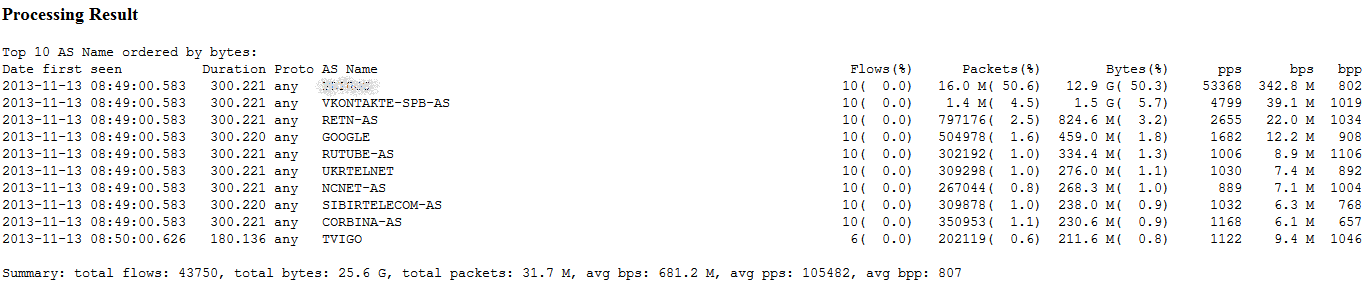
Traffic analysis is the first step toward optimizing and improving the quality of services provided by telecommunications operators. Reports and graphs show actual bandwidth consumption, the busiest routes, and the most “greedy” consumers. This information allows you to make informed priority settings, identify in advance the application or user with the highest bandwidth load, see trends, and protect the network from overload by limiting speed.