
Pros and cons of using a VPN
The main advantage of using a VPN is that it provides the necessary level of network security when remotely accessing information systems via a public network. When network equipment cannot ensure the privacy of data transmission, a VPN allows you to encrypt traffic within a secure channel.
Another advantage is the cost of the solution: while laying a private network between remote offices can cost hundreds of thousands of rubles, the price for using a VPN solution starts at zero, which is especially relevant for connecting individual employees working “in the field” to the corporate network.
One disadvantage is the limited performance of VPN solutions: it is affected by the speed of Internet access, the types of protocols used by the Internet provider, and the encryption method. Other factors can also affect performance.
VPN Protocols
There are several protocols for secure dedicated access and encryption of transmitted corporate data:
- IP security (IPsec)
- Secure Sockets Layer (SSL) and Transport Layer Security (TLS)
- Point-To-Point Tunneling Protocol (PPTP)
- Layer 2 Tunneling Protocol (L2TP)
- OpenVPN
The most commonly used types of connections include remote user access to the corporate network (remote-access VPN) and point-to-point connections between two sites (site-to-site VPN). Let’s take a closer look at them.
Remote VPN access
This technology is used to provide company employees with secure access to the corporate network and its resources via the public Internet. This is especially relevant when a public Wi-Fi hotspot or other insecure connection methods are used to connect to the Internet. The VPN client application on a remote computer or mobile device connects to the company’s VPN gateway, where user authentication and authorization take place.
IPsec or SSL protocols are most commonly used to protect remote access, although SSL is more focused on providing a secure connection to a single application (such as SharePoint or email) rather than to the entire internal network. Layer 2 connections are also possible using tunneling protocols such as PPTP and L2TP over an IPsec connection.
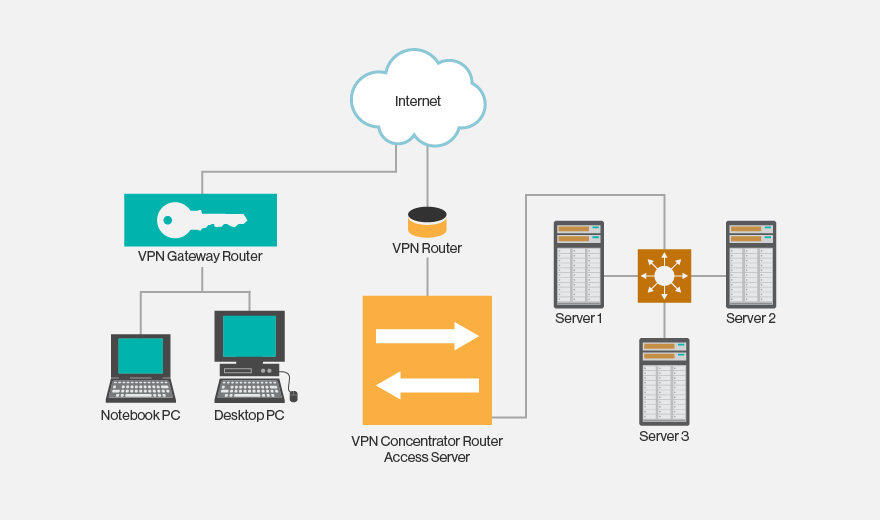
VPN remote access diagram
Point-to-point VPN connection
A point-to-point connection is used to connect an entire local network in one location to a local network in another. A typical scenario is connecting remote branches to a company’s central office or data center. This does not require installing VPN clients on user devices, as the connection is handled by a VPN gateway, and data transfer between devices on different networks is transparent.
The most popular way to protect point-to-point connections is IPsec (via the Internet), but the operator’s MPLS cloud option, without the use of public networks, is also widely used. In the latter case, Layer3 (MPLS IP VPN) or Layer2 (Virtual Private LAN Service – VPLS) connections become available.
There are several other scenarios for using VPN connections:
- between two separate devices, such as servers, in two remote data centers, when the security requirements of a standard corporate network are insufficient;
- connection to cloud infrastructure resources (infrastructure-as-a-service);
- placement of a VPN gateway in the cloud and provision of access by a cloud provider.
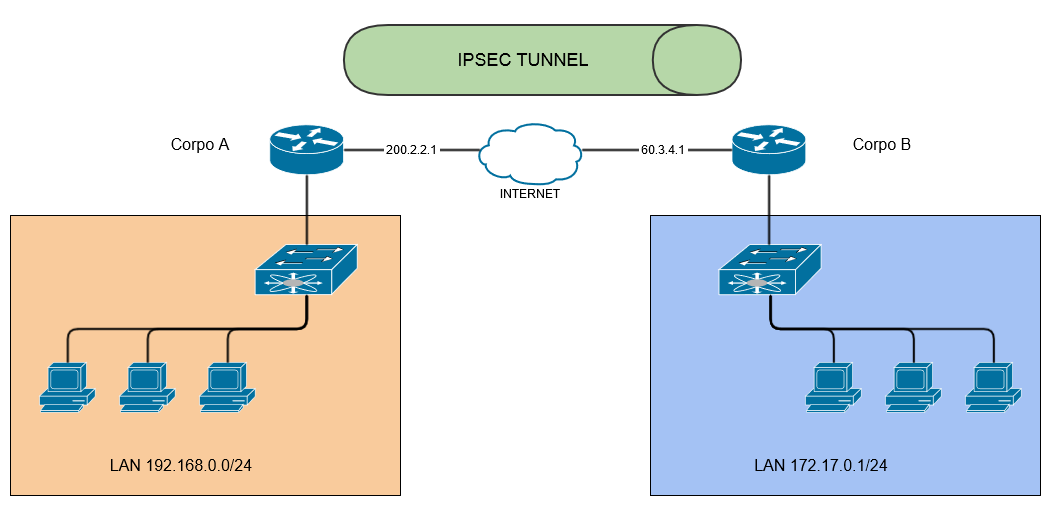
Point-to-point VPN connection diagram
Checking the security of your VPN connection
Regardless of the type of VPN you use, you need to perform your own checks to ensure a high level of security. By following a few simple steps, you can protect your network from unauthorized access.
Reconnaissance
Determine the type of VPN you are using and the port on which the VPN service is listening for connections. This can be done with any port scanning tool, such as Nmap. Depending on the type of VPN, this could be UDP port 500 (IPSec), TCP port 1723, TCP port 443 (SSL VPN), UDP port 1194 (OpenVPN), or any other non-standard port.
Usage
Once you have successfully identified the VPN port, you should scan it to determine the manufacturer and version of the VPN service. To do this, use the ike-scan tool. Once you have the required information, search the Internet, the manufacturer’s website, and the CVE catalog for vulnerabilities in this service that can be exploited using existing exploits or by creating new ones.
Authentication
A VPN service that listens to incoming connections must correctly verify the credentials provided by the client. It is not enough to simply check the login and password; security certificates must be used to increase reliability. It is also necessary to use a competent password policy (complexity, storage periods, automatic generation, etc.), which, together with the certificate, will prevent attacks and password cracking.
To sum up
A VPN connection is an important tool for organizing corporate networks, but it is important to remember that it must be supported by a telecommunications operator or Internet service provider. Many of them provide access using NAT address translation, and most devices support GRE (Generic Routing Encapsulation) tunneling. To create VPN networks, PPTP protocols are used, which require NAT equipment to support ALG (Application-level gateway).
If you have any questions about network security and traffic management, please contact the specialists at VAS Experts, the developer and supplier of the Stingray Service Gateway traffic analysis system.