Hundreds of participants demonstrate their developments and technologies, show colorful presentations on screens, organize seminars, and demonstrate the operation of their systems in real time. Thousands of visitors follow them, recording, filming, posting reviews and photos of new products on the Internet, and sharing their impressions on forums and social networks. At the same time, they continue to perform their professional duties remotely, because IT specialists are always on the job.
The task of the conference organizers is to provide stable and fast internet access for both participants and visitors. In this, the telecommunications operator (public internet access provider) can be assisted by DPI (Deep Packet Inspection) technology and devices that support it.
DPI – public Wi-Fi control
When several thousand devices are registered on a public network, saving bandwidth and controlling traffic usage becomes extremely important. A deep traffic analysis platform has many useful features, but the following are most useful for these tasks:
- Traffic filtering and prioritization.
- Data analytics.
- Protection against DDoS attacks.
- Network address translation.
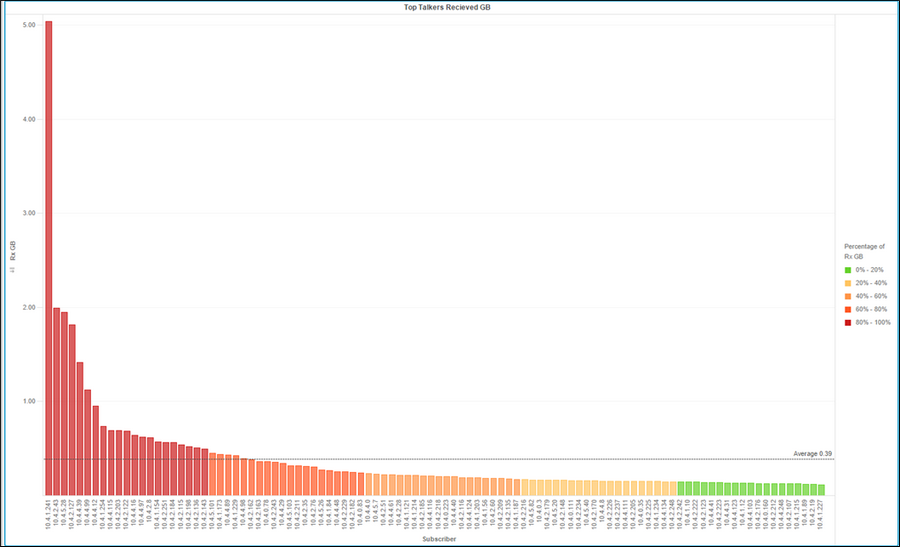
Image source: www.internetphenomena.com
Despite the fact that one device downloaded more than 5 GB of data during the conference, and several others downloaded around 2 GB, the average traffic consumption was 390 MB. This is a fairly small figure, but it was achieved by using special traffic optimization policies with the DPI platform. Namely:
- limiting access speed to 3 MB/s for each user;
- limiting access speed for the Windows Update service to 500 KB/s.
Wi-Fi usage
While the first rule is fairly straightforward—preventing a single user from hogging the operator’s bandwidth and dividing it equally among all users—the second rule is the result of the classification and analytics module. Analysis of the applications and protocols used on the network made it possible to identify the most “heavy” ones, limiting which increased the efficiency of traffic usage.
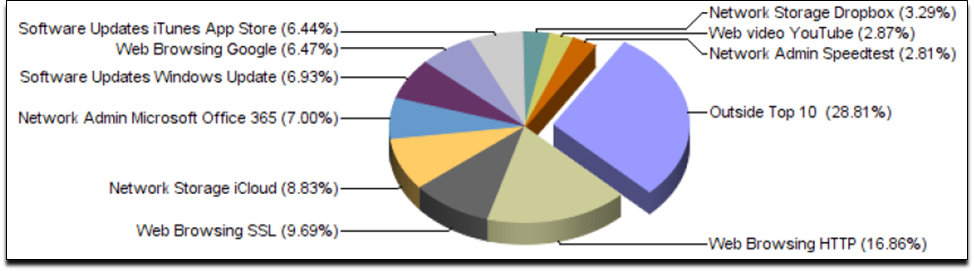
Browsing web pages via HTTP and the secure SSL protocol is, as expected, among the leaders in terms of traffic consumption, as is Office 365, which is very popular for working with documents online. Users often use Dropbox and iCloud for file sharing, which, incidentally, speaks to the popularity of Apple devices.
The next place in the ranking is occupied by update services (Windows Update and iTunes App Store). They are set to download automatically when connected to a Wi-Fi network, which is not necessary for conference visitors and can be regulated by DPI policies.
Even with the speed-limiting policy in place, Windows Update took up an average of about 7% of traffic throughout the event.
Removing restrictions
To better understand the significance of traffic prioritization policies using the DPI system, it was sufficient to disable the update download speed restriction at the end of the event.
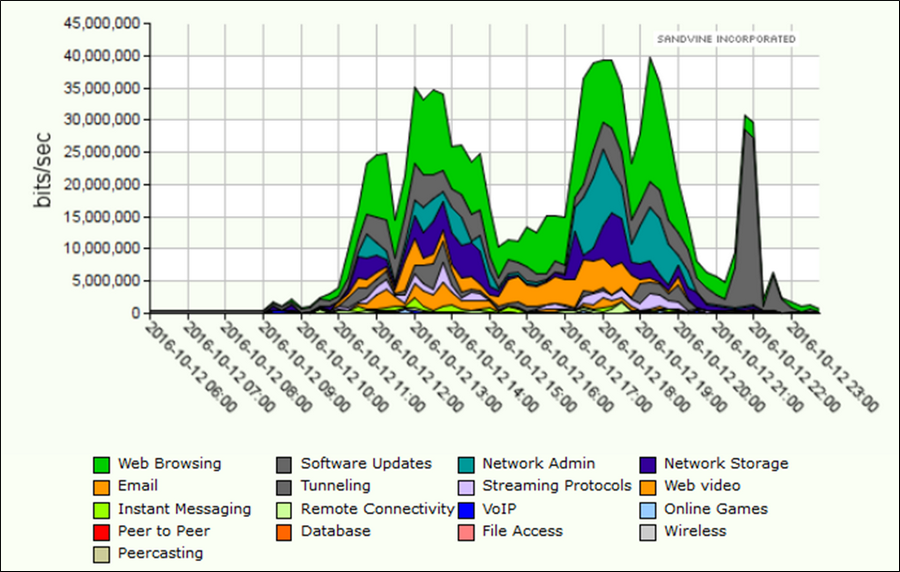
Throughout the day, bandwidth was distributed evenly among all applications, but as soon as the “Windows Update 500 Kb/s” policy was disabled at 9:00 p.m., this type of traffic (dark gray on the graph) immediately began to consume almost all network resources, making the use of other services problematic.
Wi-Fi user protection
It is important to remember that public Wi-Fi networks, especially those that are open access and use 802.11 protocols, are vulnerable to DoS attacks, which can jam any access point, disrupt network functionality, and intercept data from any of its users. This can not only compromise participants and visitors, but also damage the reputation of the organizers.

Using the TCP SYN Flood and Fragmented UDP Flood protection features of the DPI system can prevent the entire network from going down and protect its users.
The example described in the article shows only one of the ways in which the DPI platform can be used. By incorporating it into their network, telecommunications operators gain many more advantages. The specialists at the company that manufactures DPI solutions are always ready to share real-life case studies, help you choose the right hardware and software configuration, and implement it and provide ongoing support.