
Initially, the network might have used a 1/10G port configuration — this type of connection on the subscriber side is often still in place today. Over time, as load and traffic volumes grew, 25/40G interfaces began to appear in newer parts of the network. Meanwhile, traffic toward the backbone is aggregated and transmitted through several 100G ports. As a result, an operator’s infrastructure can simultaneously run equipment from different generations with varying interface throughput.
The Stingray platform takes this heterogeneity into account and covers all the main deployment scenarios (in-line, on-stick, mirror) in which interfaces of different throughput can operate simultaneously. To do this, the platform provides a set of “engines” — configurations of dpdk interfaces (data ports), each describing its own combination of operating modes. The dpdk_engine=7 configuration is responsible for the simultaneous support of different interface types within a single platform.
Why the standard engines stop being sufficient
All the previous engines (dpdk_engine=0..6) use a single dispatcher distribution scheme for the entire cluster:
- dpdk_engine=0 — one dispatcher for the entire cluster;
- dpdk_engine=1 — one dispatcher per direction (in/out);
- dpdk_engine=2 — RSS dispatchers per direction;
- dpdk_engine=3 — one dispatcher per bridge;
- dpdk_engine=4 — one dispatcher per port;
- dpdk_engine=6 — RSS dispatchers per bridge, for high-performance 100G+ NICs.
For details on each mode, see the Stingray documentation.
This model works as long as the ports have the same throughput. But operator networks more often face a different situation: many 10G ports on the subscriber-facing side and one or two 100G ports on the uplink side. This is typical, for example, of a BNG connection, where LAN and WAN throughput differ significantly. There are also more complex configurations where 100G, 40G, and 10G ports are used simultaneously with different dispatcher distribution schemes.
In such situations, a common scheme is not always optimal. Some ports may be allocated more resources than they need, while others may not have enough to handle the load efficiently.
How to distribute dispatchers independently with dpdk_engine=7
dpdk_engine=7, or the engine with explicit dispatcher configuration, lets you manually define which ports each dispatcher serves and what resources are allocated to it. Unlike the previous modes, where a single fixed distribution scheme was chosen for the whole system, this new engine makes it possible to configure the processing of each port group independently.
For each dispatcher, you can separately specify:
- the list of ports it serves;
- mempool — a memory pool for packets of a given size;
- if needed — RSS with the required number of queues.
Unlike the previous modes, there’s no need to choose a single distribution scheme for the entire cluster here. Ports can be split into groups, and each group can have its own processing configuration.
At the same time, dpdk_engine=7 is universal: it can be used to implement any distribution scheme available in dpdk_engine=0..6.
For example, “one dispatcher per direction” (the equivalent of dpdk_engine=1) is written as follows:
in_dev=port1:port2
out_dev=port3:port4

dpdk_dispatch=port1,port2;mempool=main
dpdk_dispatch=port3,port4;mempool=main

dpdk_mempool=name=main;size=1600000
You can also configure a mixed scheme, where some ports work through a regular dispatcher and others through RSS:
in_dev=port1:port2
out_dev=port3:port4

dpdk_dispatch=port1:port2;mempool=main10G
dpdk_dispatch=port3:port4;rss=16;mempool=main100G

dpdk_mempool=name=main10G;size=1600000
dpdk_mempool=name=main100G;size=8000000
Here, the 10G group is served by a single dispatcher with the main10G mempool, while the 100G ports are served by a dispatcher with RSS (16 queues) and a separate, larger main100G mempool. Processing parameters can be tuned separately for port groups with different performance levels.
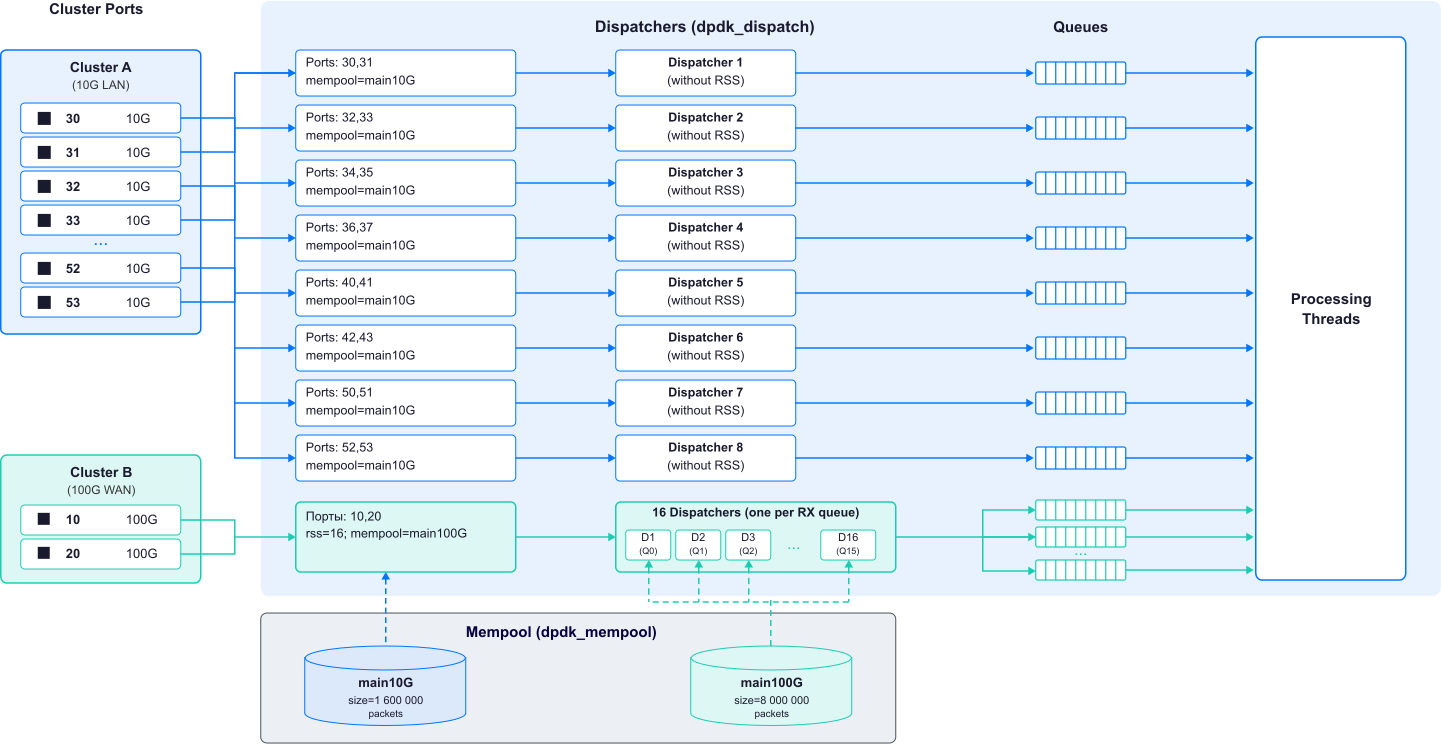
Figure 1 — dpdk_engine=7 dispatch architecture
As for limitations: the configuration will be considered invalid if a port is not included in any dpdk_dispatch or is included in more than one. A port must belong to only one dpdk_dispatch, and all ports within a single dispatcher must belong to the same cluster.
What mixed configurations look like for large operators
One operator needed this kind of scheme after upgrading its uplinks. High-speed interfaces appeared at the upper level of the network, while 10G connections remained at the lower level. Fully upgrading these interfaces wasn’t practical, since replacing the equipment and ports would have required significant resources.
At the same time, traffic from different sources converged on a single server. Splitting its processing across separate servers would have meant deploying additional equipment and using compute resources inefficiently.
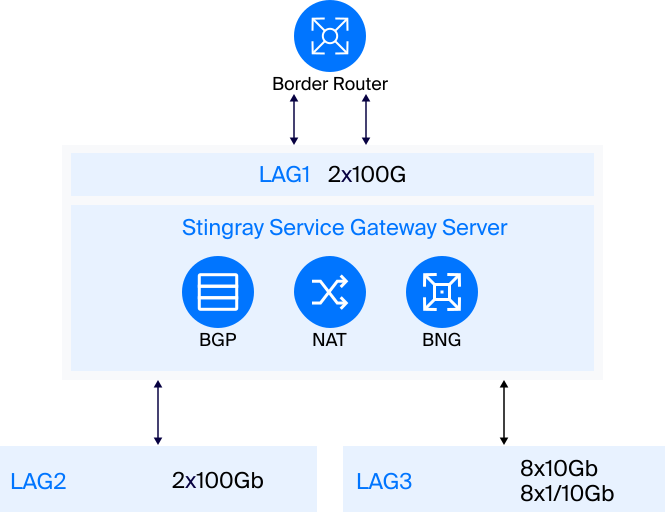
Figure 2 — Operator network diagram
Previously, Stingray allowed bridges to be built only from interfaces with the same throughput. The mixed configuration required the ability to independently configure the processing of different port groups.
dpdk_engine=7 makes it possible to set a different number and type of dispatchers for each group. This makes it possible to account for differences in interface throughput and avoid allocating the same resources to ports with different loads.
As a result, the system didn’t have to be redesigned around a single interface speed, nor did the processing of individual groups have to be offloaded to additional servers. In the end, it was possible to adapt the processing to the network’s existing configuration and make more efficient use of the available hardware resources.
What dpdk_engine=7 delivers
dpdk_engine=7 removes a limitation of the earlier engines — the inability to apply different dispatching strategies to different parts of a single cluster. This is especially important for large-scale installations with a heterogeneous set of NICs, where precisely tuning the number of dispatchers and the amount of memory for a specific port group directly affects performance and core savings.
If you have questions about the number of dispatchers, mempool size, or other parameters when switching to dpdk_engine=7, contact VAS Expert technical support. Our specialists will help you choose a configuration suited to your specific connection scheme and interface load.