
There are only a few places where accounting data gets lost. You can list them, calculate the size of the loss for each one in advance, and turn that loss from a property of the system into a configurable parameter. There are four such places: a processing node failure, rebalancing, a control node switchover, and a rule set change.
In this article, we’ll go through each of them, show how to estimateand limit the losses, and explain which metrics to monitor so you cancatch a problem in time.
How accounting worksin a service gateway
A service gateway consists of processing nodes and control nodes.Several components take part in traffic accounting:
- Processing node (DPI) is a service gateway component in the userplane that subscriber traffic physically passes through.
- Control node (PCEF) is a service gateway component in the controlplane that sends processing nodes the thresholds for each accountinggroup and receives usage reports.
- Billing (OCS) is an external charging system. It grants trafficquotas and receives usage reports.
- PCRF is an external policy management system. It defines thesubscriber’s service policy and the set of groups the subscriber isallowed to use. Sometimes the PCRF also acts as the OCS.
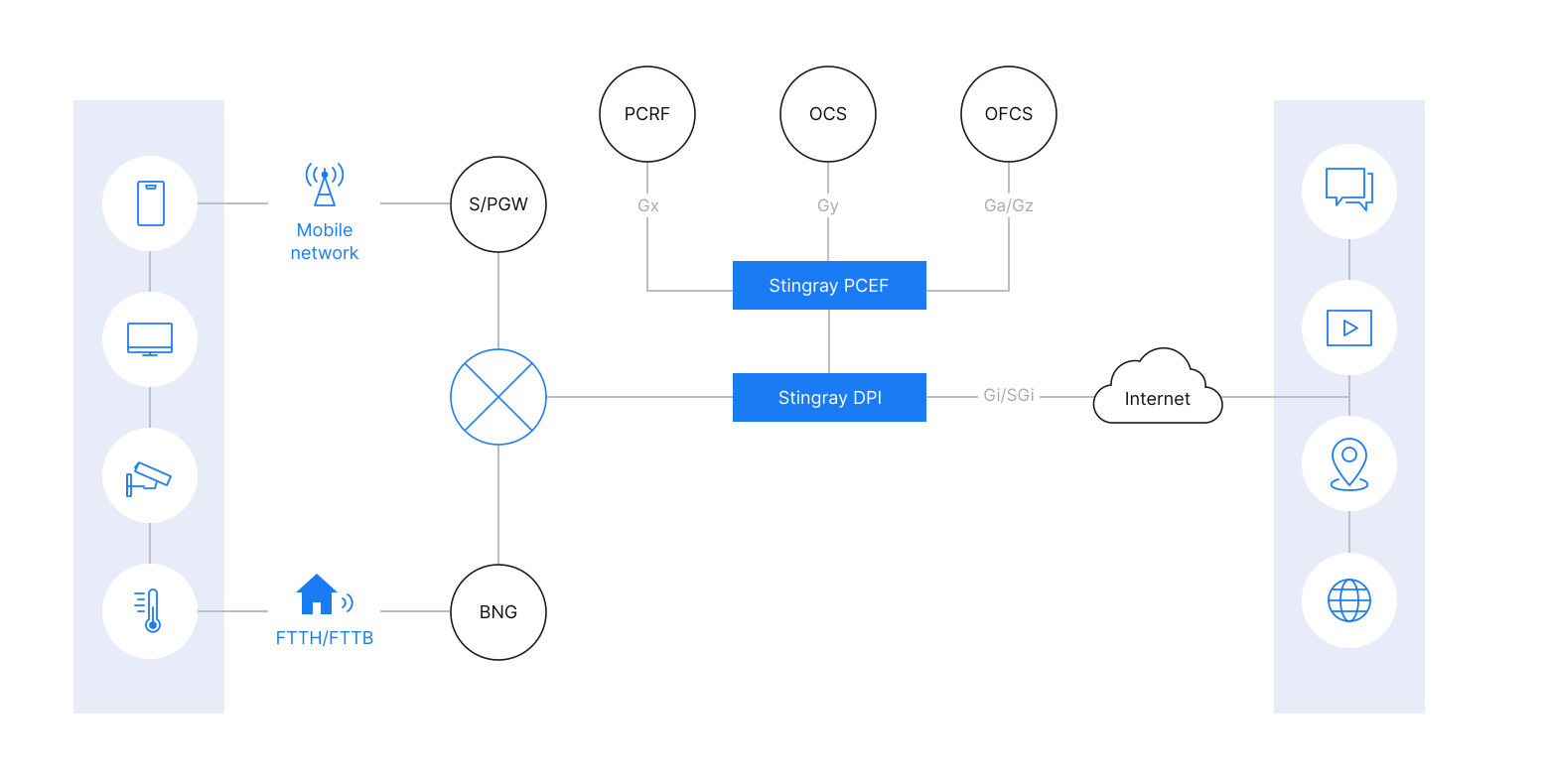
Figure 1. Service gateway architecture
The basic unit of accounting is the accounting group. It combines traffic from several services that are charged the same way, and the DPI reports on their total volume. For example, a “video streaming” group with the identifiers RG 10 and SI 0 (Rating Group and Service Identifier) can collect traffic from YouTube and other video services.
The DPI classifies packets, assigns them to accounting groups, and keeps a volume counter for each group. The PCEF gets volume data from DPI reports. The PCEF also stores the session state: granted credits, consumed volume, and quota validity periods.
The PCRF also defines rate limits for each accounting group. The OCS grants volumes for each allowed group and receives usage reports.
The accounting cycle starts with the PCRF. It tells the PCEF which accounting groups are available to the subscriber. The PCEF requests volumes from the OCS for each allowed group and passes the set of groups, with their limits and thresholds, to the DPI.
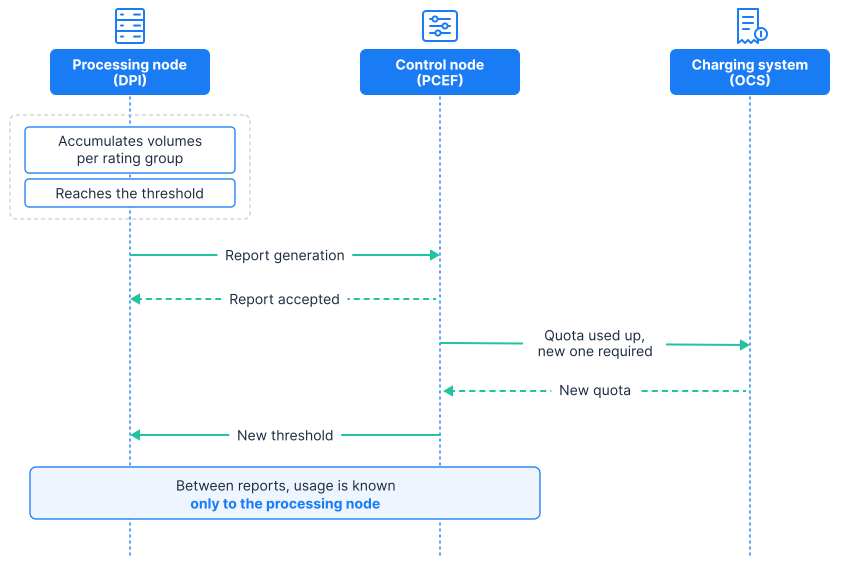
Figure 2. The accounting cycle
When usage in a group reaches the threshold, the DPI sends a report to the PCEF. The report can also be sent earlier if the PCEF requests it. The PCEF forwards the data to the OCS or PCRF and gets back a new quota or a new rule set, which it then sends to the DPI. All communication between the DPI and the OCS goes through the PCEF.
The weak spot of this cycle is the gap between reports. Until a report arrives, neither the PCEF nor the OCS has any data on accumulated usage. That usage exists only in the DPI counters. If a node fails or a session moves during rebalancing, the unreported volume is lost. This is the root cause of accounting losses.
Place one: processing node failure
When a node fails, some loss is unavoidable, since the node has no time to send its accumulated data. But the size of the loss can be calculated in advance:

The formula gives an estimate for a fully loaded node. Over the interval between two reports, such a node passes a volume equal to its throughput multiplied by the length of the interval. On average, a failure happens in the middle of that interval, so roughly half of that volume is lost.
Here is what this looks like for a node with a throughput of 200 Gbps.
| Average interval between reports | Loss on node failure |
| 5 minutes | about 3.75 TB |
| 1 minute | about 750 GB |
| 30 seconds | about 375 GB |
The numbers look impressive, but at the scale of a node this is not much. The final financial loss depends on how often nodes fail and how the lost traffic is charged.
According to the formula, the loss is proportional to the interval between reports. The DPI sends a report when a session has used a volume equal to the threshold. The smaller the threshold, the faster it is reached, the more often reports are sent, and the shorter the interval, which means a smaller loss.
The unreported volume of each session never exceeds its threshold. This means the loss on a processing node failure never exceeds the sum of the thresholds of all sessions on that node. So losses can be controlled through thresholds, which in turn are set by the PCEF control node.
By default, the PCEF sets the threshold equal to the quota from the OCS. In that case, the sum of thresholds on a node equals the quota multiplied by the number of sessions. That is how much will be lost in the worst case if the node fails. To reduce this risk, the operator can cap possible losses in advance.
Risk budget
For this purpose, the PCEF from VAS Experts has a risk budget: the maximum volume that is acceptable to lose if a single node fails. The operator can set it in the configuration for the node as a whole and separately for each service group. When a budget is set, the PCEF checks that the quota granted to a subscriber, multiplied by the number of sessions using that service, does not exceed it.
If the budget is exceeded, the quota is split: the processing node gets a smaller reporting threshold. The PCEF adds up the interim reports itself and sends a report to the OCS only when the entire quota has been used.
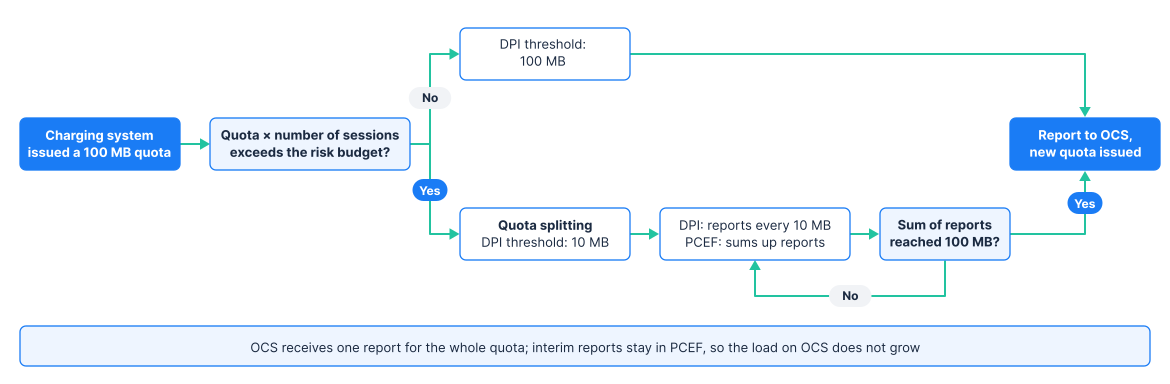
Figure 2. Splitting a quota to fit a set loss budget
Calculation example
The charging system has granted a 100 MB quota. Two scenarios are possible:
- The quota, taking the number of sessions into account, fits within the risk budget. The control node sets a 100 MB threshold. When the threshold is reached, the PCEF sends a report to the charging system and requests a new quota.
- The quota exceeds the risk budget. The control node sets a 10 MB threshold, and the processing node sends an interim report after every 10 MB. As soon as the interim reports add up to 100 MB, the control node sends a report to the charging system and requests a new quota.
Instead of a risk budget, you can use a simplified option. The quota is divided by a fixed factor or capped at a constant value. The setting applies to all services at once or to each one separately. The simplified option does not take the number of sessions into account. It limits the loss per session rather than for the processing node as a whole. Its advantage is that no calculations are needed, which makes it a convenient starting point for deployment.
Two reporting frequencies instead of one
In our solution, quota splitting is handled by the PCEF. The PCEF sends configuration to the DPI nodes over PFCP. This protocol makes it possible to give a DPI node a reporting threshold smaller than the quota. The PCEF determines the threshold size and adjusts it to the configured risk budget. For example, say the operator has specified that no more than 100 GB of unreported traffic may accumulate on a single node for the “video streaming” group. If only one subscriber uses the service, the PCEF will give them a 50 GB threshold. If there are a million subscribers, the DPI will report on each session roughly every 100 KB.
Without splitting, the threshold equals the quota, so the DPI reports to the PCEF exactly as often as the PCEF reports to the OCS. With splitting, these two frequencies are decoupled and set independently.
| Reports | What sets the frequency | Result |
| From the control node to the charging system (PCEF to OCS) | What sets the frequency | The load on the charging system does not change |
| From the processing node to the control node (DPI to PCEF) | The risk budget | The loss on a processing node failure does not exceed the risk budget |
Without splitting, the operator has to make a trade-off. Frequent reports reduce losses on failure but put a load on the OCS. Infrequent reports take load off the OCS but increase losses. With splitting, only the reports from the processing node to the control node become more frequent. This exchange happens inside the service gateway and costs less than communicating with the charging system.
Three conditions for the mechanism to work correctly
Interim reports are not sent to the charging system
Interim reports are not passed on to the OCS. The OCS receives a report when the entire quota has been used, and also when the quota expires or the session ends. Interim reports would multiply the load on the OCS by the number of parts the quota is split into, which is exactly what splitting is meant to prevent.
The quota exhaustion action is triggered only after the entire quota is used
The charging system can assign an action for when the quota runs out: blocking or redirection. An interim threshold only triggers a report, while the action is performed once the entire quota has been used. If the action were tied to the interim threshold, a subscriber with a 100 MB quota would be blocked after just 10 MB.
Splitting has a lower limit
The smaller each part of the quota, the more reports there are, and if the quota is split too finely, the internal exchange also becomes a noticeable load. That’s why the threshold has a minimum value. If the risk budget can’t be met even at that minimum, the PCEF generates a warning: exceeding the budget without notifying the operator is not acceptable.
Place two: rebalancing
Losses during rebalancing are less visible than losses on failure. When the distribution of subscribers across nodes is calculated as a function of the list of live nodes, any change to that list moves some sessions to other nodes. The subscriber loses the connection, and that is noticeable. But the volume accumulated on the old node since the last report disappears along with the session.
Rebalancing is triggered not only by failures but also by the planned addition of a DPI node, a routine operation for scaling capacity. In other words, accounting data is lost precisely when the network is supposedly being improved.
Learn how to grow without affecting subscribers in our article Scaling in the CUPS model: how to grow without affecting subscribers.
To keep the volume from being lost, the session is moved to the new node in a controlled way:
- The PCEF creates a session on the target node, transfers the subscriber’s services and profiles, and sets the threshold to the remaining quota.
- The subscriber’s traffic is switched to the target node.
- The PCEF terminates the session on the source node, and the source node sends a final report.
- The PCEF adds up the volumes counted by both nodes and sets a new threshold on the target node.
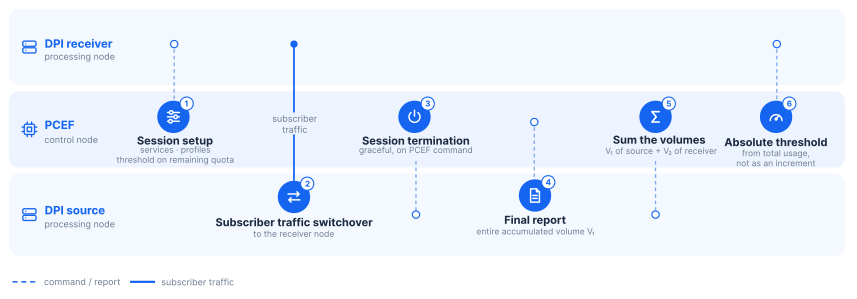
Figure 3. Moving a session without losing accounting data: adding up volumes and setting an absolute threshold on the target node
With this kind of move, nothing is lost. The source node terminates the session normally and sends all accumulated volume before doing so. There is no double counting either. Each byte is counted by only one of the two nodes, and the new threshold on the target node is set as an absolute value based on the total usage across both nodes, not as an increment on top of what the target node has already counted.
A controlled move has one more advantage. The subscriber’s connection is not interrupted, and usage is known precisely. This means the charging session doesn’t need to be closed and reopened. With a large number of sessions, the difference is significant. Closing and reopening a single charging session takes four messages: a request and a response to close it, and a request and a response to open it. If a processing node with four million sessions is taken out of service by closing and reopening them, the charging system will receive up to sixteen million messages. With a controlled move, there is no exchange with the charging system at all.
Place three: control node switchover
The PCEF keeps the state of charging sessions in memory: granted quotas, consumed volumes, quota validity periods, and the request numbers sent to the charging system. With quota splitting, the running totals of interim reports are stored there as well. When a control node fails, its sessions are taken over by another control node. Without this state, the new node doesn’t know how much quota is left or when it expires. That’s why session state is kept in shared storage available to all PCEF nodes. The storage has to meet two requirements.
Quota validity periods are stored as an absolute expiration time, not as time remaining
A record saying “the quota is valid for another 400 seconds” is useless to a new control node, because it doesn’t know when the record was created. A record saying “the quota is valid until 14:32:07” is unambiguous at any moment. This requirement assumes that the clocks on all PCEF nodes are synchronized.
The request number for the charging system is saved to storage before the request is sent, not after
Every request to the OCS within a session gets its own number. The OCS discards a request with a number that has already been used as a duplicate. Suppose a control node sent a request and failed before saving the number to storage. The new control node will take the last saved number from storage and reuse it. The OCS will discard the request, no new quota will be granted, and the session will be left without a quota. To avoid this, it’s enough to save the request number to storage first and only then send the request. This is easy to implement in code. What’s much harder is noticing the bug in the first place. It occurs rarely and looks like a random glitch affecting a single subscriber.
Place four: rule set change during a session
The PCRF can change the rule set in the middle of a session, for example when switching from a daytime rate plan to a nighttime one. The volume counted before the change must be charged under the old rules. Otherwise, traffic consumed under the daytime plan will be charged at the nighttime rate.
The mechanism is simple, but it requires a strict order of steps:
- The DPI receives new rules from the PCEF.
- The DPI sends a report on the accumulated volume.
- The DPI applies the new rules.
- The DPI confirms the rule change to the PCEF.
The confirmation is sent after the report, so by the time the PCEF learns about the rule change, all volume under the old rules has already been accounted for.
There is a gap between sending the report and applying the new rules during which the accounting configuration is undefined. For that period, a default rule that blocks the subscriber’s traffic must be in effect:
Don’t wait for billing reconciliation
Accounting errors don’t show up right away, and by the end of the billing period their cause can no longer be traced. To catch a problem in time, monitor these six metrics.
| Metric | What an increase means |
| Difference between the number of opened and closed charging sessions | Some sessions are not terminating normally, and their final usage is not being reported |
| Number of sessions moved without a final report | The number of cases of lost volume is growing |
| Average interval between reports for active sessions | The multiplier in the formula for loss on a processing node failure is growing |
| Sum of thresholds of all sessions on a processing node | The upper bound of the loss if this node fails is growing. Getting close to the risk budget is a reason to revisit quota splitting |
| Lag of nodes behind updates to the session distribution table | Nodes are using an outdated distribution table. Subscriber traffic may reach a DPI node that no longer serves their session |
| Number of reports from a processing node that no longer serves the session | The number of late reports is growing |
The last metric needs some explanation. When a session is moved to another DPI node, the previous node may send a report late. For example, the report was sent before the switchover but reached the PCEF after it. Such a report contains real subscriber traffic that hasn’t been accounted for anywhere yet. If the PCEF discards it just because that node no longer serves the session, the volume will be lost. In other words, the service gateway will lose accounting data on its own, without any failure at all. That’s why late reports must be accepted and added to the usage of the session they belong to.
Summary
Traffic accounting losses occur in four situations, and only one of them is unavoidable: a processing node failure. The node doesn’t have time to send its accumulated volume, and that traffic drops out of accounting. But even here, the loss can be kept under control: its upper bound equals the sum of thresholds on the node, and with a risk budget, the operator decides how much they are willing to lose. In our solution, the PCEF adjusts thresholds to this budget on its own, so the loss bound for any node failure is known in advance, and the load on the OCS does not increase.
In the other three situations, losses can be avoided by building the right order of operations in from the start:
- during rebalancing, sessions are moved to another processing node in a controlled way;
- quota validity periods are stored as absolute time;
- the request number is saved before the request is sent;
- accumulated volume is reported before the rules change.
All of this is easy to set up in advance. Finding the cause of a discrepancy after billing reconciliation, on the other hand, is almost impossible.