
Let’s examine what happens inside CG-NAT under botnet load, why ordinary subscribers suffer, and what tools can stop it.
How a Botnet “Eats Up” CG-NAT Resources
Most operators use CG-NAT (Carrier-Grade NAT) technology — a setup where the carrier uses a single public IPv4 address for a group of subscribers simultaneously. Subscribers receive private IP addresses, and when accessing the internet their traffic passes through a shared gateway where it is translated to one of the operator’s public addresses.
This solves the address-space shortage, but simultaneously creates a dependency — the NAT resource is finite.
Operators typically allocate NAT ports with oversubscription. A single subscriber may be assigned up to 2,000 ports, while dozens of users simultaneously share the same public IP. In theory this yields hundreds of thousands of connections, but the physical limit stays the same — around 64,000 ports per IP address.
When several subscribers with infected devices sharing the same public address start generating thousands of short UDP sessions, they instantly exhaust the entire allocated port pool.
As a result, legitimate subscribers using that same address are forced to compete with botnet devices for ports and stop receiving new connections — browsers hang, calls drop, streaming cuts out. Meanwhile, the infected user often has no idea their device is participating in an attack.
What Happens to NAT Under Botnet Load
Beyond port exhaustion, botnet attacks directly impact CG-NAT performance. Botnet flooding becomes a stress test for non-obvious linear-search code paths inside the NAT engine. An ordinary subscriber maintains an average of a few dozen to a few hundred simultaneous connections. An infected device, however, creates thousands per second — with traffic patterns fundamentally different from normal user behavior.
As a result, this traffic:
- rapidly fills translation tables;
- overloads queues;
- creates resource contention between threads.
If there is even one non-optimal code path, a botnet will very likely turn it into a bottleneck. The end result is degradation not only of availability but of the entire NAT system’s performance. This is why, when optimizing the CG-NAT product, VAS Experts developers account not only for normal traffic behavior but also for potential attack scenarios that could affect overall system stability.
The Main Source of Botnets — Subscriber Devices
The primary infection vector is home and SOHO routers that have not received security updates in a long time. In April 2026, the US NSA officially urged users to update router firmware, having recorded a wave of attacks through outdated devices.
NSA / FBI Warning (April 2026)
The US National Security Agency backed an FBI warning that foreign hacking groups are deliberately targeting vulnerable routers worldwide — including through vulnerability CVE-2023-50224 in TP-Link devices. Attackers exploit poorly secured home routers to intercept data and build botnet infrastructure.
Regulatory recommendations boil down to basic hygiene: change default usernames and passwords, disable remote management from the internet, install current firmware, and replace devices no longer supported by the manufacturer. In practice, however, most home users do not follow these steps on their own.
This means operators must protect not only their own infrastructure but also subscriber devices — otherwise the damage from a botnet is shared by everyone.
IP Blacklists: A Problem for the Entire Subscriber Base
The second critical effect of a botnet is having the operator’s IP addresses land on blocklists. When infected hosts begin sending spam, participating in DDoS attacks, or scanning the internet, the operator’s public IPs get recorded in blocklists maintained by services such as Spamhaus, AbuseIPDB, Cloudflare Radar, and others.
The impact of a botnet infection spreads to everyone. Blocking a single public IP on a stop-list instantly affects up to 100 “clean” subscribers who sit behind the same NAT address. They start receiving rejections when trying to send email, register on websites, use CDN services, or access cloud storage. Complaints flood into technical support — while the source of the problem lies with a neighboring subscriber.
As a result, the problem extends beyond an isolated incident. The operator faces not only technical risk but also reputational damage. Users perceive the restrictions as a service outage rather than the consequence of an infection within the network.
Diagnostics become additionally complicated. In a CG-NAT environment, linking malicious activity to a specific subscriber is more difficult, and the process of cleaning up IP reputation takes time and requires coordination with external services.
For the operator, this is no longer a local security issue — it is a factor directly affecting service quality and subscriber retention.
How It Works in Practice: UDP Flood Detection and Mitigation
Here is a practical example of detecting botnet activity and neutralizing it at one of VAS Experts’ operator clients.
Step 1. Attack Detection via QoE Analytics
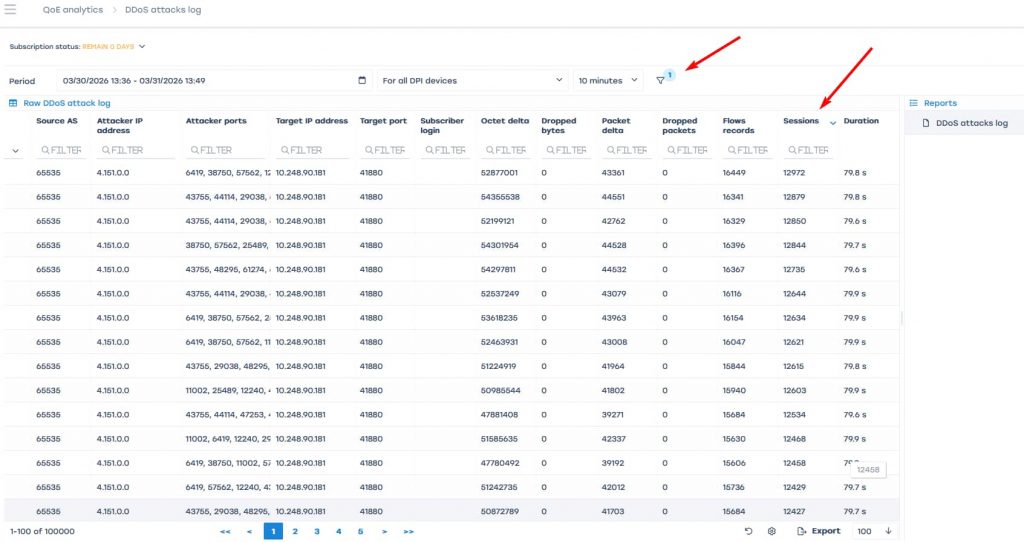
In the QoE Analytics module, under QoE Analytics → DDoS Attacks → Top Attacks, statistics for the past 24 hours were exported. Sorting was set by the Sessions column in descending order to immediately surface the heaviest-session directions.
In a normal situation, the top of the list looks fairly uniform — values may differ but without sharp spikes. In this case, however, the top of the list showed anomalous activity on one internal address — 10.248.90.181 — with session counts radically exceeding the norm.
Step 2. Traffic Analysis and Attack Signature
The next step was to navigate to QoE Analytics → DDoS Attacks Log to examine exactly what was driving this load. The period was kept at Last 24 Hours; a filter was added for Target IP address = 10.248.90.181, and results were again sorted by Sessions.
Filtering the log by the target IP address 10.248.90.181 revealed a characteristic picture:
| Protocol ~99% of traffic — UDP (Net protocol: 17) |
Sessions per record ~12,000–13,000 per log entry |
Packets per flow Median 2–4 packets (very short flows) |
| Target port Almost all traffic hitting port 41880 |
Attacker ports Wide spread — typical of a botnet |
Conclusion UDP Flood — volumetric DDoS attack from a botnet |
Nearly all traffic turned out to be UDP (Net protocol: 17). TCP was almost absent, so the possibility of ordinary user activity — web browsing, streaming, messaging — could be ruled out immediately.
Examining the structure of the records further: the log contained many rows, each describing a short flow with a very large number of sessions — approximately 12,000–13,000 sessions per entry, yet only 2–4 packets per flow.
A large number of records (tens of thousands) with a small packet count per flow and an enormous session count is the classic signature of a botnet generating short UDP sessions.
Looking at the destination of the traffic: the report showed a large number of ports in the Event Object column, while almost all entries pointed to the same target port — 41880. The load was therefore not random but directed at a specific point. The spread of source ports rules out a single attack source and confirms the coordinated participation of many infected devices.
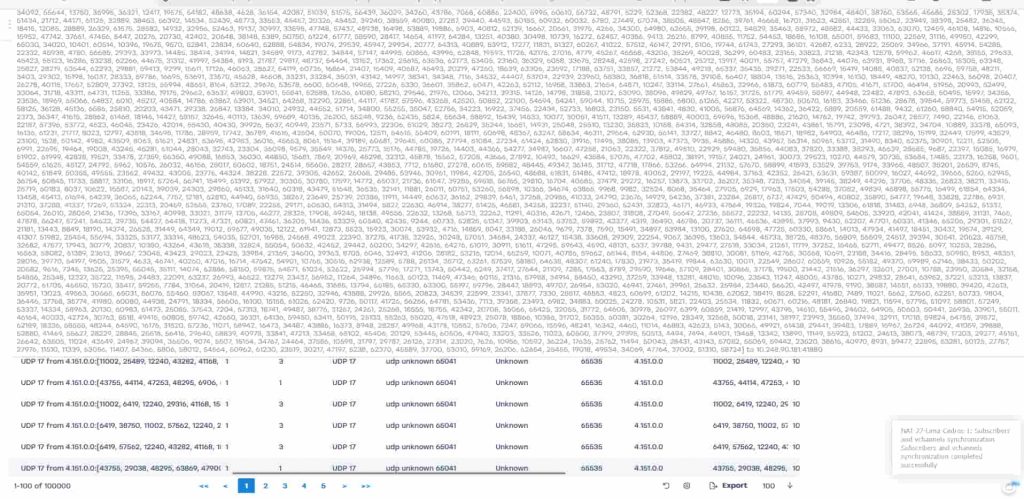
A classic UDP Flood picture, distributed across many sources.
Step 3. Automated Mitigation
The neutralization process is triggered automatically through the following chain:
- QoE detector. Anomaly detected via session count.
- List of attacking IPs. The Attacks container is populated.
- GUI / script. UDP UNKNOWN DROP profile is assigned.
- Deployment to DPI. Blocking is applied on network nodes.
- Block removal. Once per day when no attacks are detected.
The entire cycle — from dump insertion to profile application on DPI — takes a few minutes. When an attack is detected, the UDP UNKNOWN – DROP profile is applied on the DPI for subscribers placed in the container. All UDP traffic classified as UNKNOWN is blocked.
The container is reviewed once per day. If no repeated activity has been recorded during that time, the IP is automatically removed and the block is lifted automatically.
For real-time monitoring, Telegram channel notifications are configured for every change to the attack container:
- IP added → instantly upon detection.
- IP removed → once per day at midnight.
An engineer can check the current state of containers and blocks in the CLI at any time.
Stingray AntiDDoS — Protecting the Operator Network from DDoS and Botnets
The Stingray AntiDDoS platform detects and blocks attacks in real time. The QoE Analytics module collects IPFIX Fullflow data from Stingray DPI, builds a baseline profile of normal traffic, and uses neural-network algorithms to identify deviations — including botnet activity, UDP Flood, and SYN Flood.
When an attack is detected, the system automatically:
- builds a list of attacking IPs,
- applies a blocking profile on the DPI,
- removes restrictions after traffic normalizes.
Why an Operator Must Fight Botnets in Its Own Network
First, botnet traffic directly exhausts the NAT resource. A single infected subscriber can occupy ports allocated for dozens of other users. Second, the operator’s public IP addresses end up on international blocklists, and restrictions begin to affect all clients behind that address — not just the source of the problem. Third, devices with outdated firmware become reinfected if no centralized measures are taken.
Under these conditions, automation becomes mandatory. Manual response takes hours and scales poorly. Automated scenarios based on QoE and DPI allow anomalies to be detected and malicious activity to be restricted within minutes — without requiring engineers to be involved in every incident.