
What Is a Wi-Fi HotSpot and Why Does an Operator Need One?
A Wi-Fi HotSpot in an operator network is a mechanism for providing public internet access with user session management. Unlike home Wi-Fi — where a device receives an IP address and immediately begins transmitting traffic — an additional processing layer appears here, related to subscriber identification and state control.
This layer does not affect the connection itself, but determines how traffic is subsequently handled. The operator needs to know who is accessing the network, what state the user is in, and what restrictions apply to them.
When a device connects to the network, it first receives an IP address; any attempt to open a website is then intercepted. The user is redirected to a Captive Portal, completes authorization, and only then are restrictions lifted.
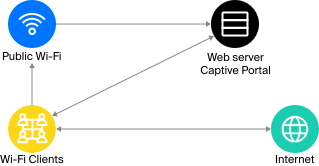
Architecture for Wi-Fi authorization via Captive Portal
Authorization management resides on the DPI side. It is responsible for redirection, tracks the subscriber’s state, and switches the traffic handling mode.
Isolated HotSpot Scenario
HotSpot Architecture Components
Looking at the architecture, a HotSpot can be implemented in two ways. In one case it is deployed as a standalone solution; in the other, it becomes part of a BNG. The difference between them is not in the DPI-level authorization mechanics, but in how the system is integrated with other components.
In the first scenario, the HotSpot is deployed as a separate environment with its own infrastructure. It includes:
- A DHCP server that issues IP addresses;
- DPI, which manages access;
- A Captive Portal web interface for authorization.
The subscriber completes the entire journey within this scheme: connects to Wi-Fi, receives an address, makes the first request, and instead of the requested resource is taken to the authorization page. After identity confirmation, DPI lifts the restrictions and the user gains internet access.
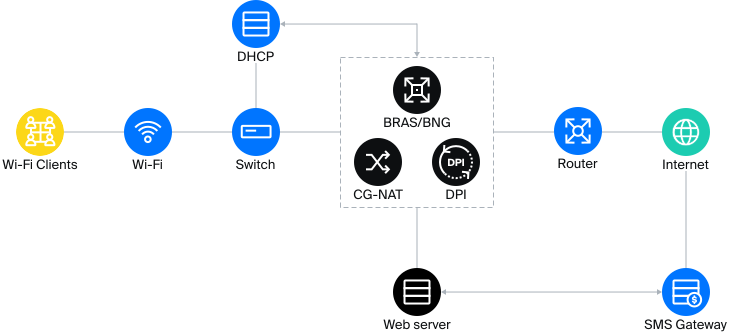
Architecture of the isolated HotSpot scenario
This model is used when a service needs to be launched quickly or a local task needs to be addressed without changes to the existing infrastructure.
However, in such a system a user who has completed authorization remains within the environment, so any changes related to tariffs or policies must be implemented separately.
Case Study: HotSpot at a Public Venue
This approach is often chosen for standalone venues where fast access provisioning is important. For example, one telecommunications operator deployed public Wi-Fi on the territory of a large open-air venue. This involved a distributed zone with a large number of access points and a high density of connections. Users moved between access points and connected from different devices, while the entire scheme remained isolated.
In this task, the HotSpot was deployed as a separate environment. All subscriber traffic passed through DPI, where initial restrictions were set and users were redirected to the authorization page. After identity confirmation, restrictions were lifted and the user gained internet access.
In terms of authorization methods, the system was not limited to a single option. In addition to the classic SMS-based flow, other mechanisms were used: via incoming or outgoing call, via vouchers, through external systems and APIs, and via user accounts — for example, corporate accounts or those integrated with other services. In some cases, the user was offered a choice of authorization method directly on the portal page.
HotSpot as Part of the Subscriber Model
How a Wi-Fi HotSpot Works Inside a BNG
In the second scenario, the HotSpot is not separated into a standalone system. It is embedded into the BNG — the point through which subscriber traffic passes. The user connection still begins with a Captive Portal. But after authorization, the user is processed in the same way as any other subscriber on the network. Their session is tracked, and tariffs, restrictions, and policies managed from a shared billing system are applied.
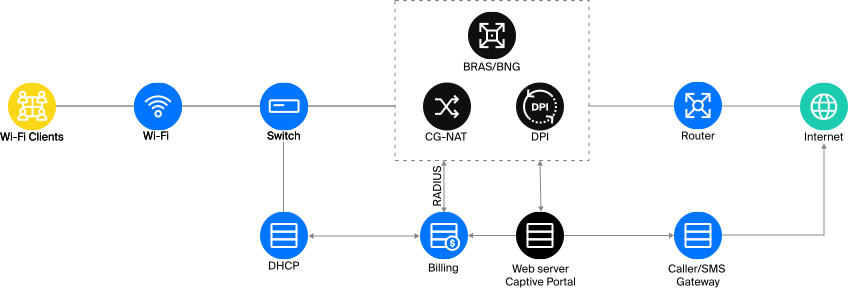
Architecture of the HotSpot scenario inside BNG
BNG in this scheme is responsible for session management: it checks access, applies rules, and interacts with billing. DPI in this scheme continues to manage traffic — enabling application identification and flow-level management.
As a result, the HotSpot becomes one of the ways a subscriber can connect — just like home access or a corporate segment. This simplifies management: rules are defined in one place and applied to all subscribers, including Wi-Fi users.
More details on the Captive Portal mechanics can be found in the documentation.
Case Study: Moving HotSpot into BNG
In practice, these scenarios rarely exist as completely independent options. More often, one becomes the continuation of the other as the network evolves. The isolated solution is used first, allowing the service to be launched quickly without infrastructure changes. Over time, requirements emerge for subscriber accounting, tariff management, and centralized control, at which point the HotSpot logic is moved into the BNG.
In the case of one VAS Experts client, this transition took several years and was tied not only to the development of Wi-Fi, but also to the growth of the entire network. In the early stages, disparate solutions were used that eventually could not keep up with the increasing load. Limitations manifested in the number of sessions, performance, and management complexity.
Migration to Stingray Software BNG and Integration with Hydra Billing
Initially, Wi-Fi HotSpot existed as a separate service. As the operator’s network grew, the decision was made to move it inside the BNG in order to handle it within the common subscriber model. This required billing integration and a rework of the authorization mechanism.
With the introduction of the Stingray platform, DPI was first added as a standalone element handling traffic analysis and filtering tasks. The operator then initiated full use of Stingray as a BNG and implemented RADIUS-based authorization with Hydra billing. This stage took considerable time: the interaction logic had to be implemented through an API, combining authorization, accounting, and tariff rules in a single system.
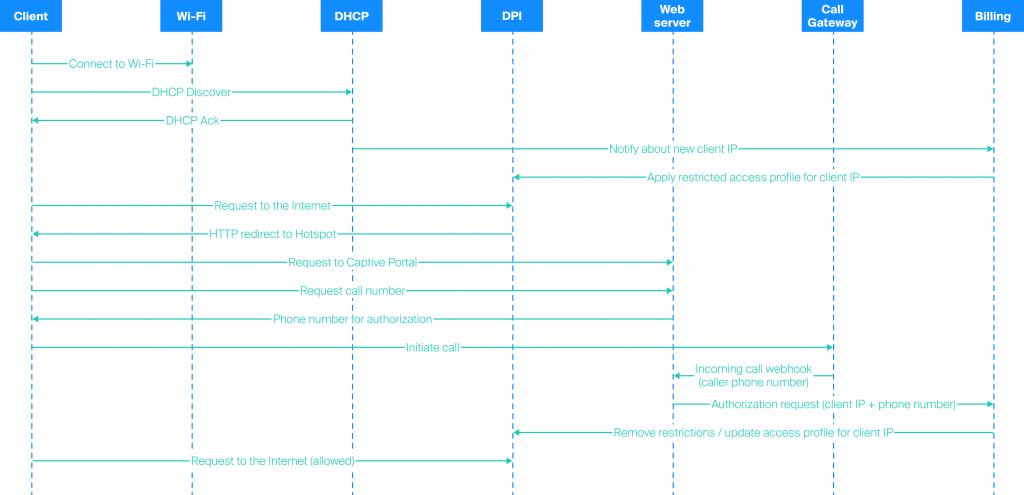
User authentication flow in the access control system
In parallel, the Wi-Fi identification mechanism itself was reconsidered. Initially, SMS authorization was used, but as the cost of messages rose, it became economically unviable. As a result, the operator switched to a scheme based on an outgoing call from the subscriber.
The user interaction point remained within the VAS Experts Captive Portal. The portal supports different authorization scenarios — from SMS and calls to external systems and APIs — and is configured for the operator’s specific business model. The interface is additionally customized for the client: the operator can adapt the authorization page to their own brand, add logos, advertising elements, and modify user flows.
The HotSpot became part of the overall architecture. Authorization remained the same — via Captive Portal — but from that point on, the user session is processed within the common model, taking into account tariffs, access rules, and subscriber state.
How Network Operations Changed
In 2025, the operator completed the migration of Wi-Fi HotSpot into BNG. The system now handles thousands of connections per day: approximately 3,000 new authorizations and more than 5,000 Wi-Fi connections daily, a significant portion of which pass through Stingray. Authorization is saved on the device for up to two weeks, so users can move between access points without re-authenticating.
| Layer / Behavior | Isolated HotSpot | HotSpot in BNG |
| Network position | Separate environment with its own processing logic | Embedded in the subscriber aggregation point (BNG) |
| Session lifecycle | Separate from the main network | Unified with all other subscribers |
| Tariff application | Local logic or custom scenarios; changing rules requires separate configuration in the HotSpot | Ability to change rules in billing and apply a single tariff to all users |
| Behavior under load | Load grows within the isolated environment | Distributed across the common network architecture |
| User data | Stored separately | Used in overall network analytics |
Isolated HotSpot vs. HotSpot in BNG
Network operation under load also changed. Previously, the standalone HotSpot handled part of the logic independently; now all traffic passes through a single point where management mechanisms are already configured. This makes network behavior more predictable as the number of connections grows.
Session processing has become centralized. The authorization, tariff, and access management logic is no longer duplicated across systems but operates in a single environment. This has simplified changes: new rules are applied immediately to all subscribers, including Wi-Fi users.
Additionally, the HotSpot is no longer an isolated data source. Information about connections is used together with the rest of the network statistics, providing a more complete picture of load and subscriber behavior.